
Email Bounce Rate: Benchmarks and How to Reduce It
A high bounce rate is rarely one problem. It is usually three or four small ones stacked up, and people tend to attack them in the wrong order, starting with the interesting technical work and finishing with the boring list hygiene that would have fixed most of it.
So this is ordered by how much each step is actually worth, not by how satisfying it is to do.
What is email bounce rate?
Email bounce rate is the share of messages in a send that were returned undelivered: bounced messages divided by messages sent, as a percentage. Send 10,000, get 250 back, and the bounce rate is 2.5 percent. Most tools report it per campaign and split it into hard bounces (the address or domain does not exist) and soft bounces (full mailbox, busy server, temporary block). Mailbox providers watch the hard-bounce share most closely, because it is the clearest sign of a list that was never verified.
Bounce rate benchmarks
The acceptable number depends on the kind of mail, because providers judge each differently.
| Send type | Healthy | Watch | Damaging |
|---|---|---|---|
| Marketing to an opted-in list | under 1% | 1 to 2% | over 2% |
| Transactional (receipts, resets) | under 0.5% | 0.5 to 1% | over 1% |
| Cold outreach | under 2% | 2 to 5% | over 5% |
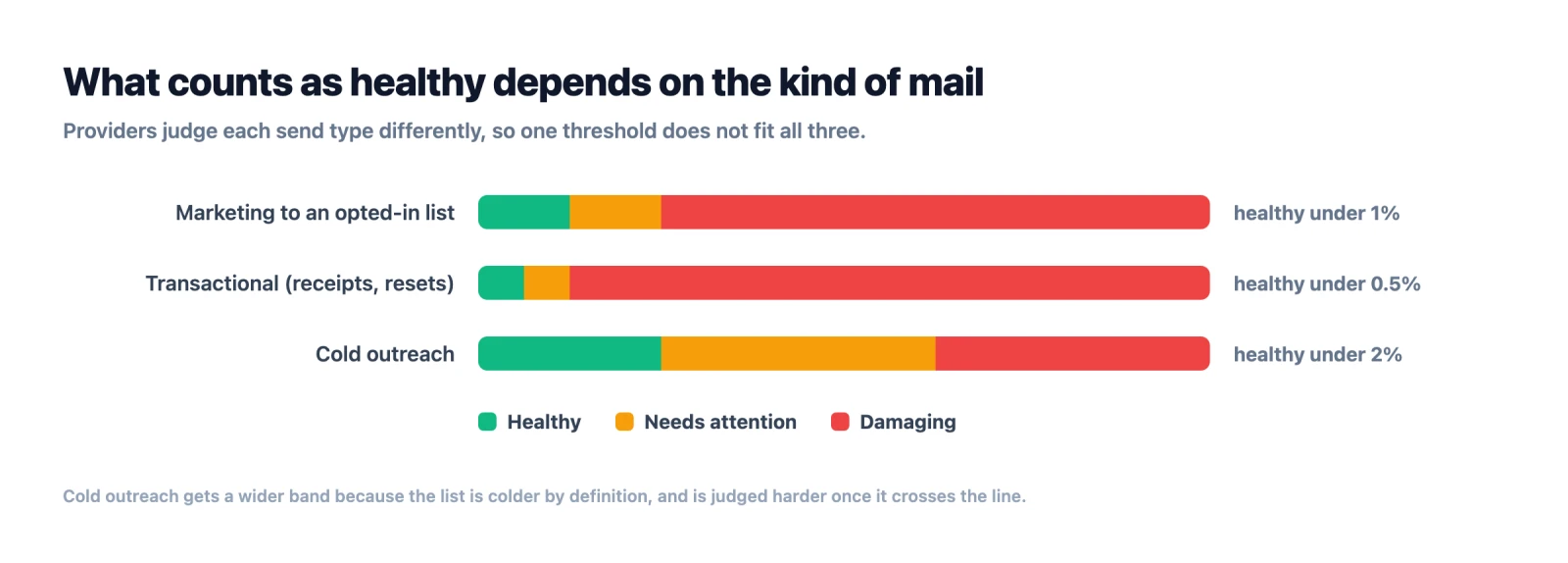
Cold email gets a wider band because the list is colder by definition, but it is also judged harder once it crosses the line: a cold campaign at 6 percent draws blocks faster than a newsletter at the same rate. The bands are what deliverability teams use in practice; Google and Yahoo's bulk-sender rules put the spam-complaint ceiling at 0.3 percent, and a bounce rate above these bands tends to travel with complaints.
What is the average email bounce rate?
The figure quoted most often is somewhere around 2 to 2.5 percent across all senders. Treat it as trivia rather than a target, because the average is assembled from senders whose lists have almost nothing in common, and the spread inside it is far wider than the number suggests.
If you search for average email bounce rate by industry you will find a table repeated on dozens of sites, with tidy figures for ecommerce, healthcare, education and so on. Those numbers nearly all trace back to one Mailchimp benchmark page, and that page currently publishes open rates, click rates and unsubscribe rates only. There is no bounce-by-industry table on it. The sites quoting the figures are largely quoting each other, and several of them sell email verification.
Industry is a weak predictor anyway. Two SaaS companies in the same category will have bounce rates an order of magnitude apart if one grew its list through opt-in forms and the other bought it. What actually predicts the number is where the addresses came from and how long ago.
| Where the list came from | Typical total bounce | Why |
|---|---|---|
| Consumer opt-in, sent within 90 days | under 0.5% | Addresses are self-reported and recently confirmed |
| Business opt-in, sent within 90 days | under 1% | Same, but corporate mailboxes close when people leave |
| Business opt-in, not sent in 12 months | 2 to 5% | Roughly a quarter of B2B contact data goes stale in a year |
| Cold B2B, verified before sending | 1 to 3% | The residue is mostly catch-all domains a verifier could not resolve |
| Cold B2B, not verified | 5 to 15% | Nothing has removed the addresses that no longer exist |
| Purchased or scraped, not verified | 10 to 30% | Resold data ages on the vendor's shelf before it reaches yours |
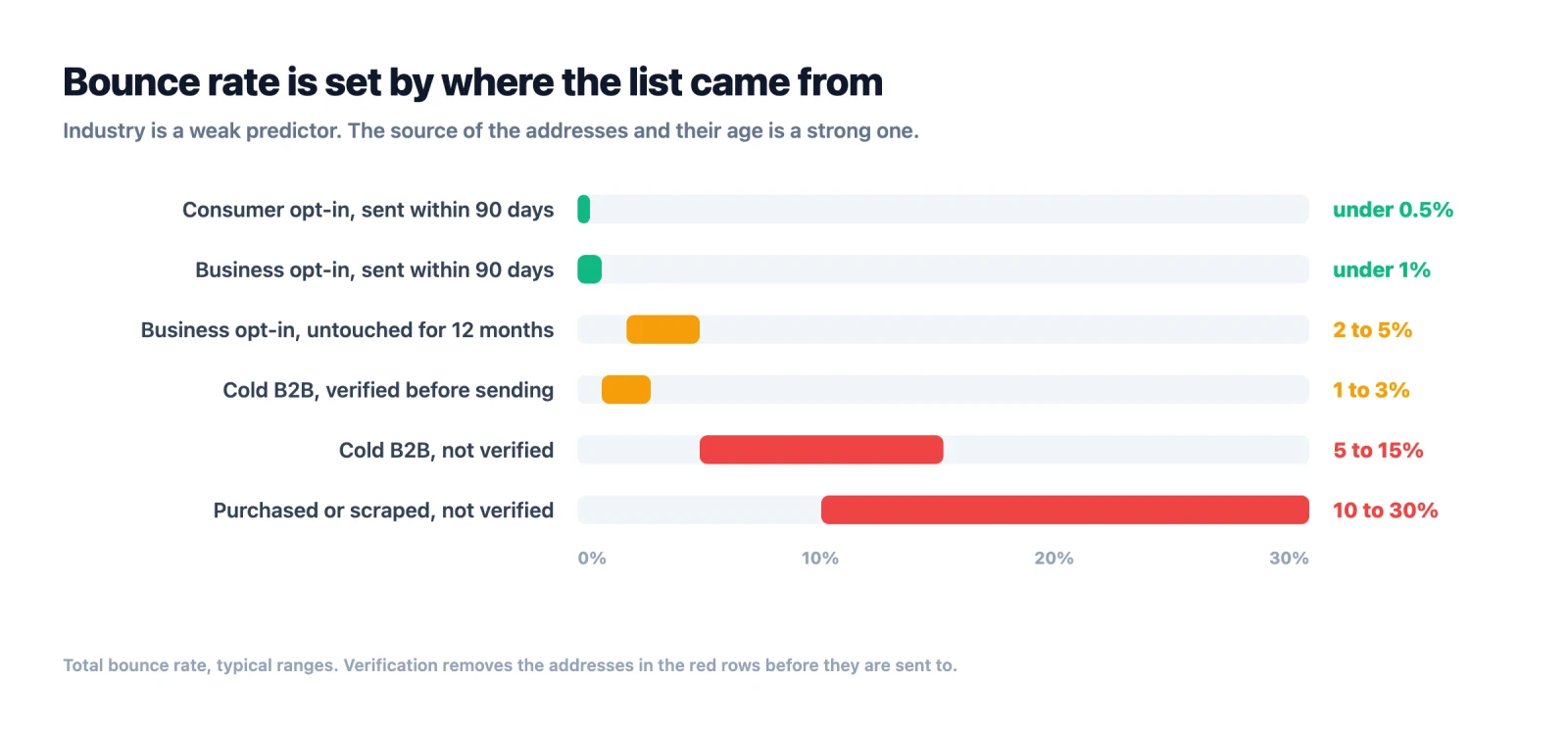
B2B runs higher than B2C at every equivalent stage, for a reason that has nothing to do with sector: people change jobs, and a corporate mailbox usually closes when they do. A consumer address at a free provider can sit unused for years and still accept mail.
So the useful question is not how your rate compares to your industry. It is which of the rows above describes your list, and whether you have done the one step that moves it.
First, know which kind you have
Your sending tool splits bounces into hard and soft. The two mean different things and the fix for one does nothing for the other.
A hard bounce is permanent. The mailbox does not exist, the domain does not exist, or the server has flatly refused you. Sending again will produce the same result forever. This is the category that damages you, because mailbox providers read a pattern of hard bounces as a sender who does not know who their recipients are, which is what a spammer looks like from the outside.
A soft bounce is temporary. The mailbox is full, the server is down, the message was too large, or you have been greylisted and told to try again shortly. Most sending tools retry these automatically and a good number resolve themselves.
Pull your last campaign report and get the split before doing anything else. If you are mostly hard bouncing, this is a list problem and the rest of this article is mostly about that. If you are mostly soft bouncing at a steady rate across every campaign, the problem is more likely reputation or infrastructure, and cleaning the list will not move it much.
What counts as bad
There is no universal threshold, but the numbers people work to are fairly consistent.
| Hard bounce rate | What it means |
|---|---|
| Under 2% | Normal for a maintained list |
| 2% to 5% | The list is aging or was not verified before sending |
| Over 5% | Providers are likely already throttling you |
| Over 10% | Expect suspension from most sending platforms |
Cold outreach runs at the higher end of normal because the data is bought or scraped rather than opted in. Under 3% is a reasonable target for a cleaned cold list, and if you are running a warm list of people who signed up, you should be well under 1%.
The step that fixes most of it
Verify the list before you send. That is the whole step and it accounts for the large majority of hard bounces on almost every list we see.
An email address checker works through the syntax, confirms the domain exists and has mail servers configured, then checks whether the specific mailbox is real. Run it on the whole list before a campaign, and run it again on anything older than about six months, because B2B addresses decay quickly. People change jobs. Companies restructure. An address that was good in February is not necessarily good in August, and roughly a quarter of B2B contact data goes stale in a year.
There is one thing to watch here, and it is the reason a lot of people verify and still bounce. About 30% of a business list sits on catch-all domains, which accept mail for every possible address whether or not a mailbox exists. Most verifiers cannot resolve those and return them labelled risky, unknown or accept-all. You then have two bad options: delete a third of your list, or send to it and find out the hard way.
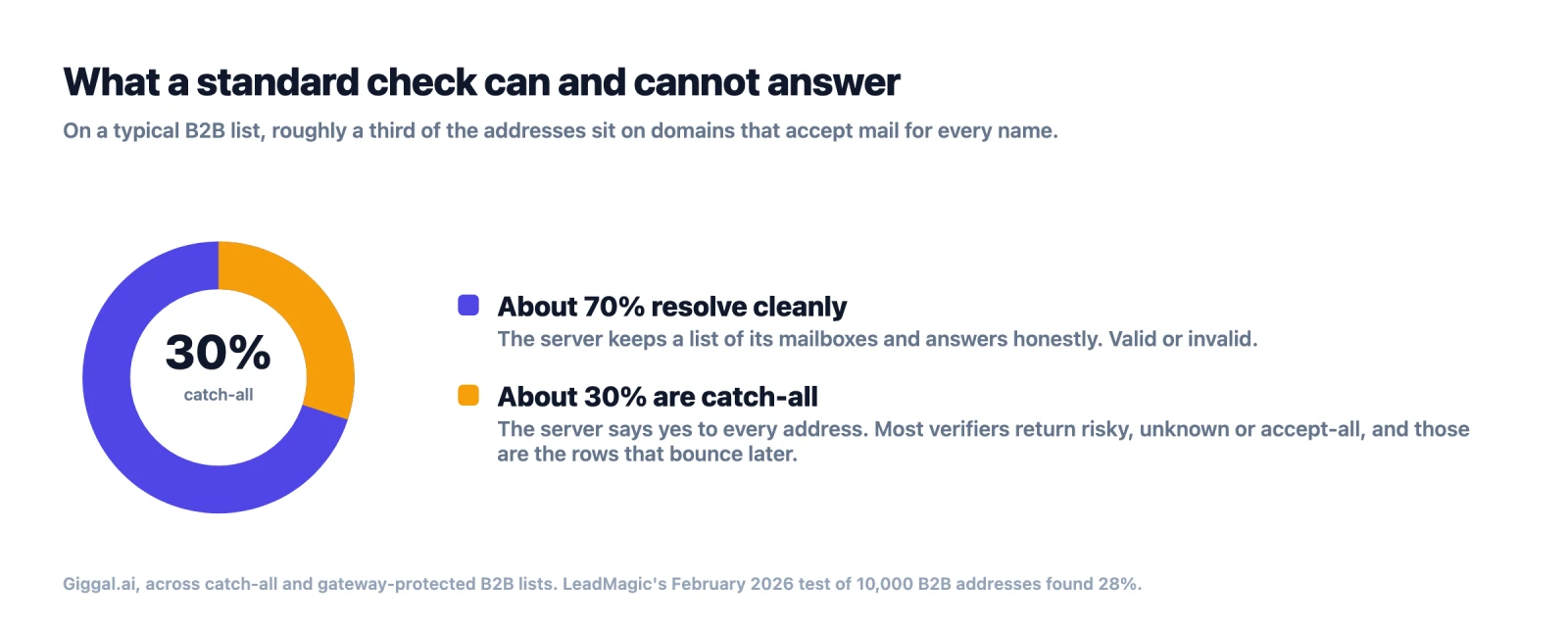
Deleting is the safer of the two and it is what most people do, which is why a verified list can still feel thin. A verifier that resolves catch-all addresses to a real valid or invalid result gets you out of that choice. That is what Giggal.ai is built for, and it applies the same treatment to mailboxes behind secure email gateways like Proofpoint and Mimecast, which fail in a similar way for a different reason.
Then, remove the addresses that were never going to work
Two categories are worth stripping even when they verify as valid.
Role addresses are shared aliases: info@, sales@, support@, admin@. They usually exist, so they pass verification, but they land in a shared inbox that nobody personally owns. Engagement is poor and complaint rates are higher than average. For cold outreach they are close to worthless.
Disposable addresses come from temporary mail services and exist for a few minutes. They pass verification while they are alive and vanish afterward. When you clean your email list, any decent verifier flags both categories separately from valid, so this is a filtering step rather than extra work.
Fix the intake, not just the list
If bad addresses keep arriving, cleaning is a treadmill.
Put real-time verification on your signup forms so a typo is caught while the person is still on the page, which is a single API call at the point of submit. Most of the value here is catching gmial.com and hotmial.com at the moment they are typed, which is both a deliverability fix and a better experience for someone who genuinely wanted to hear from you.
Drop the confirm-your-email-address second field. It does not work. People copy and paste from the first field, and you have added friction for no benefit.
If you buy lists, verify them the day they arrive rather than the day you send. Vendors sell the same data repeatedly and it ages on their shelf, not just yours.
The authentication work
This used to be filed under things that do not reduce bounces, and that advice has aged badly. SPF, DKIM and DMARC control whether receiving servers trust that you are who you claim to be, and two of the largest providers now refuse mail outright when they are missing.
Microsoft began rejecting unauthenticated bulk mail to Outlook.com, Hotmail and Live addresses on 5 May 2025. Senders above 5,000 messages a day without all three records get 550 5.7.15 Access denied, sending domain does not meet the required authentication level. That is a 5xx code, so your sending tool records it as a hard bounce, against a mailbox that exists and would have accepted the message. Gmail tightened in the same direction in November 2025, moving from filing suspect mail in spam to rejecting it at the SMTP level.
The practical effect is that an authentication gap now shows up in your bounce report rather than quietly in your open rate. If a large share of your bounces carry 5.7.x codes and your recipients are concentrated at Outlook or Gmail, the list is not your problem and verifying it again will not help.
Set the three records up properly, verify them once with any of the free DMARC checkers, and then stop thinking about them. If your bounces are mailbox-does-not-exist errors instead, which carry 5.1.1, no amount of DNS work will change them.
Warm up if the domain is new
A brand new sending domain that sends 5,000 messages on day one will be throttled, and throttling produces soft bounces that look like a list problem.
Start at low volume and increase over two to four weeks. Most sending platforms automate this now. If yours does not, ramp it by hand and resist the urge to skip ahead, because the reputation you are building is the thing that determines whether the next campaign lands.
A sequence that works
Read the hard and soft split from your last campaign. Verify the whole list, including the catch-all portion, rather than discarding it. Remove role and disposable addresses. Put verification on the signup form so the problem stops recurring. Confirm SPF, DKIM and DMARC once. Warm the domain if it is new. Then send, read the new numbers, and repeat the verification step every quarter.
Most lists get from an unpleasant number to an acceptable one on the second step alone. The rest of the list is there to stop it drifting back.
Nothing in that sequence is clever, which is the point. Almost everyone who sets out to reduce email bounce rate starts with the authentication records because they feel like engineering, and finishes with the list because it feels like admin. The order above is the other way round for a reason.
To find out which row of that table your own list is in, take the last 500 addresses you sent to and run them before the next campaign. Giggal.ai gives 1,000 credits free with no card, and they work on a bulk upload, so the sample and the real thing cost the same: nothing.