
DMARC Record Generator
Build a valid DMARC record for the current standard, or paste your old one to clean it up.
Receives daily XML summaries of pass/fail counts from mailbox providers
Individual failure reports (many providers don't send these, for privacy)
Generated DMARC DNS Record
How to publish your DMARC record
- Build the record above, or paste your current one into Import to clean it up.
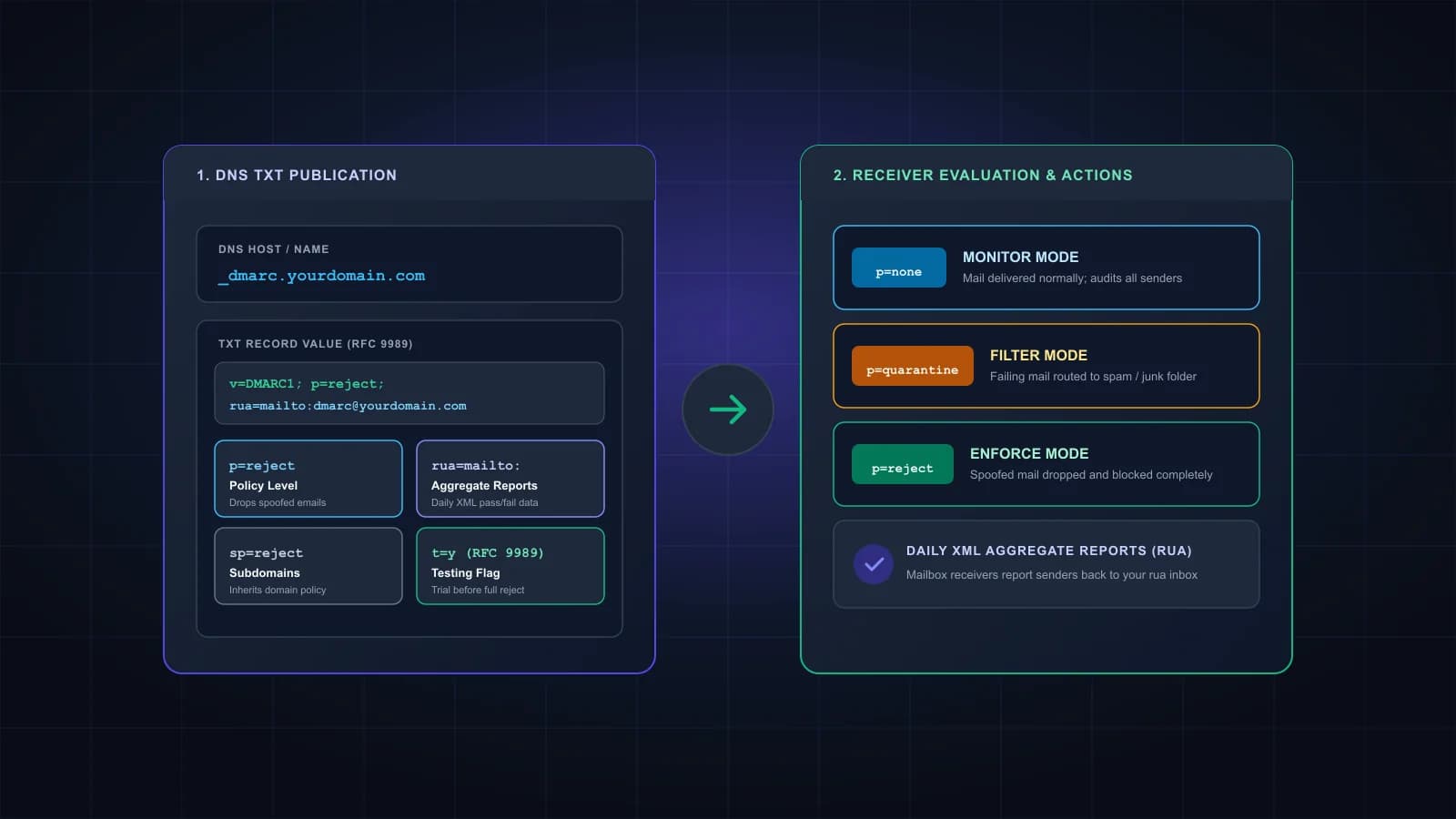
- At your DNS host, create a TXT record with the host name _dmarc. Some providers want the full name, _dmarc.yourdomain.com.
- Paste the value and save. Make sure it's the only DMARC record on the domain; receivers that find two ignore both.
- Wait for DNS to update, then watch your rua mailbox. Providers that send aggregate reports should send them at least once every 24 hours.
What changed for DMARC records in 2026
In May 2026, RFC 9989 replaced RFC 7489 and put DMARC on the Standards Track. Records still start with v=DMARC1, so existing records keep working. Three tags are retired: pct, rf and ri. Two are new: t, a test mode, and np, a policy for subdomains that don't exist. This DMARC record generator never writes the retired tags, and the import option strips them from older records. The full tag list is in what is a DMARC record.
Which DMARC policy to choose
Start with p=none and a rua address. Nothing changes for your mail, and the reports show you which services send as your domain. The standard says getting every legitimate source authenticated can take many months. For domains whose users post to mailing lists, it suggests p=none for at least a month, then quarantine for an equally long period, comparing results before you move to reject.
The t=y option helps with the last step. Publish p=reject with t=y and receivers apply quarantine instead, so you can see what would have been rejected without losing mail. Remove t=y when you're ready.
Before you publish reject, make sure all your mail is DKIM-signed. The standard says a domain at p=reject must not rely on SPF alone, because forwarding breaks SPF. If you run your own mail server, the DKIM generator can create a key.
Reporting addresses
rua is where aggregate reports go: XML files, usually covering one day each, listing which IP addresses sent mail as your domain and whether they passed. ruf is for per-message failure reports, which many receivers redact heavily or don't send at all for privacy reasons, so don't rely on them.
If a report address is on a different domain than the one you're protecting, for example a reporting service, that domain has to publish a consent record before receivers will send anything there. The helper above writes the record for you; send it to whoever runs the reporting domain. The rule is in section 4 of RFC 9990.
Mistakes this DMARC generator prevents
The generator always puts v=DMARC1 first, because receivers ignore a record that starts with anything else. It adds the mailto: prefix that rua and ruf addresses need, and flags addresses that look wrong. It never writes pct, and when you import an old record with pct below 100 it suggests t=y instead. It warns you when you choose reject, since that's only safe once all your mail is DKIM-signed, and when strict alignment would make mail from your subdomains fail.
The one thing it can't check is your DNS. Publish the result as the only DMARC record on the domain. For how DMARC works with SPF and DKIM, see SPF, DKIM and DMARC explained.
Frequently asked questions
v=DMARC1; p=none; rua=mailto:dmarc-reports@yourdomain.com. It doesn’t change how your mail is handled, and it starts the reports. The Monitor preset builds it for you.
Not in the current standard. RFC 9989 retired pct along with rf and ri. A leftover pct=100 is harmless, but if you want a softer rollout, use t=y instead of a percentage.
It asks receivers to apply one level below your published policy, so reject is treated as quarantine and quarantine as none. It doesn’t change the reports, and it does nothing on p=none.
You need rua if you want to see what’s happening; without it you get no aggregate reports. ruf is optional, and many receivers don’t send failure reports at all.
The policy for subdomains that don’t exist in DNS, such as a made-up invoices-2026.yourdomain.com. If you leave it out, sp applies, and if sp is missing too, p does.
As a TXT record at _dmarc.yourdomain.com. Most DNS panels only need _dmarc in the host field and add the domain themselves.
DMARC done? Check your list next.
Authentication proves the mail is yours. Verifying your list stops bounces from addresses that no longer exist. 1,000 free credits.