
How to Verify an Email Address and Check if It Is Valid
Verifying an email address can take one step or several. Sometimes you can spot a bad address yourself, for free, in a few seconds. Sometimes only an email verification tool can tell you whether the mailbox exists, because it takes several layers of checks. And sometimes the mail server hides the answer so well that most tools give up and cannot tell you whether the address is valid.
This guide covers each of those cases: the checks you can do yourself, what you can do for free, whether free tools are enough, and what email verification tools can and cannot tell you.
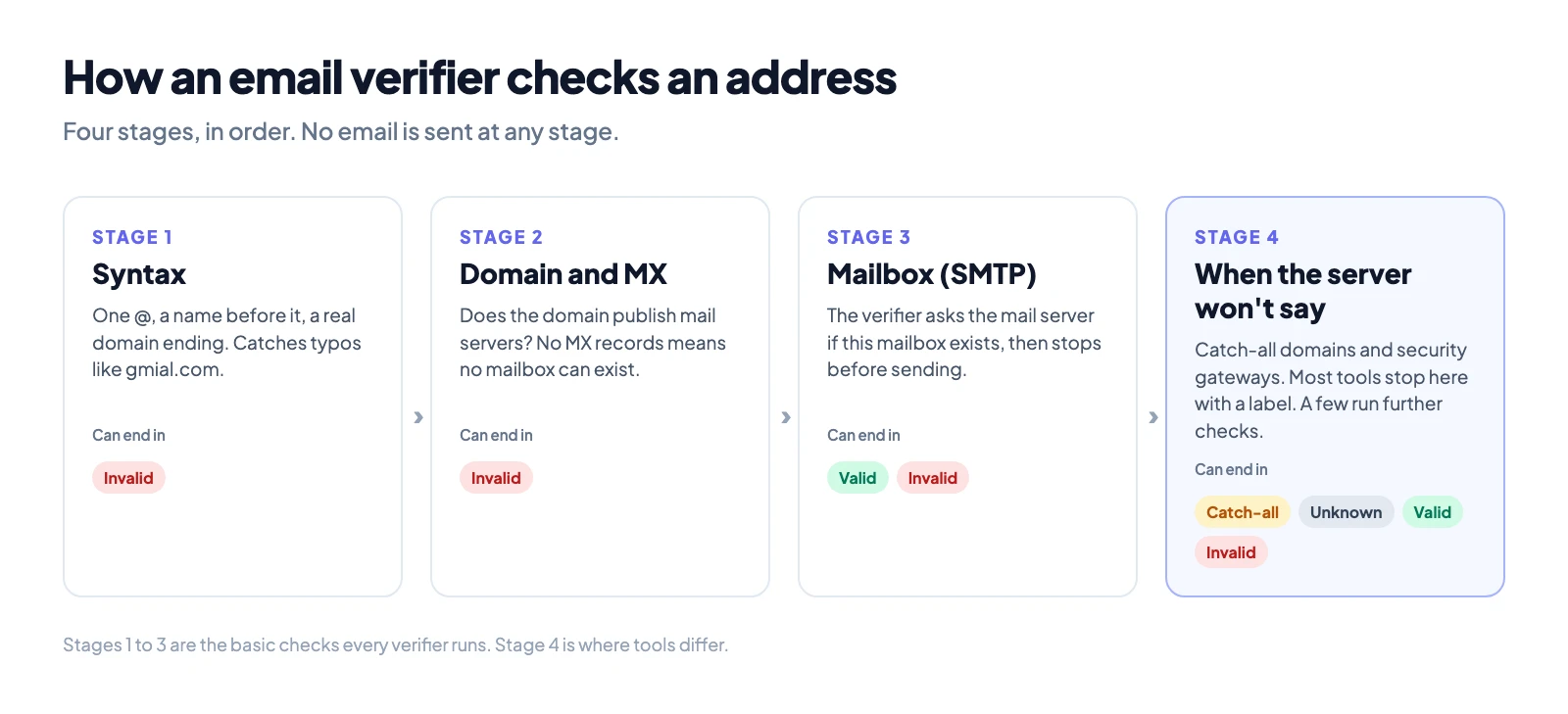
To verify an email address, check three things: that it is written correctly, that its domain can receive mail, and that the mail server confirms the mailbox exists. You can do the first two yourself for free. The third needs an email verifier, which asks the mail server without sending a message.
You get one of a few results: valid, invalid, catch-all or unknown. Valid means you can send. Invalid means you should remove the address. Catch-all and unknown need more care, and most of this guide is about those two, because that is where people get stuck.
The short answer: three ways to verify an email address
| Method | What it proves | Good for |
|---|---|---|
| Check it by eye: spelling and domain | The address is written correctly | Catching typos like gmial.com |
| Look up the domain's mail servers | The domain can receive email | Spotting dead or fake domains |
| Use an email verifier | The mailbox exists, or the server will not say | One address or a whole list |
The first two you can do yourself for free. They catch broken addresses, but they cannot tell you whether a mailbox exists. Only the third can, and the rest of this guide explains why.
Step 1: check the address itself
Start with what you can see. A valid address has one @, a name before it and a domain after it, such as name@company.com. No spaces, no commas, and the domain needs an ending like .com or .co.uk.
Look for the common typos. Most bad addresses on forms are real addresses typed wrong:
- gmial.com, gmal.com or gamil.com instead of gmail.com
- hotmial.com instead of hotmail.com
- yahooo.com or yaho.com instead of yahoo.com
- .con or .cmo instead of .com
- A missing letter in a company domain
This step costs nothing and fixes a lot. It cannot tell you whether the person behind a correctly written address exists.
Step 2: check that the domain can receive email
Every domain that receives email publishes mail server records, called MX records, in its DNS. If a domain has none, no address on it can receive mail. You can see them with an MX lookup: type the domain and look at the result.
- MX records found: the domain can receive mail. The mailbox may or may not exist.
- No MX records: the address is dead, whatever the name before the @ says.
This is still a check on the domain, not the person. jane@company.com can bounce on a domain with perfect MX records, because Jane left the company or never had an address there.
Step 3: check that the mailbox exists
This is the step that answers your real question. An email verifier connects to the domain's mail server and starts the same conversation a sender would start. It says who it is, names a sender, and then names your address as the recipient. The server answers yes, no, or something in between. The verifier then stops before any message is sent. The person never receives anything.
That conversation is the SMTP handshake. It is the basic first step, and every email verifier does it.
Is the SMTP handshake enough?
No. In 2027, a handshake on its own often does not get a real answer.
Email providers keep improving their security. Many companies now put a secure email gateway in front of their mail server, and providers add other filters on top. These systems do not give a straight answer to an unknown server that has no sending history and no reputation. Some accept every address, so the answer means nothing. Some delay the reply or refuse to answer at all.
So the handshake is where verification starts, not where it ends. What separates verifiers is what they do when the server will not give a straight answer: whether they stop at a label like catch-all or unknown, or run further checks from servers with a good reputation to get a real result.
What each result means, and what to do
| Result | What it means | What to do |
|---|---|---|
| Valid | The server confirmed the mailbox exists | Send |
| Invalid | Bad format, no mail server, or the server rejected the mailbox | Remove it |
| Catch-all (also called accept-all or risky) | The domain accepts every address, so the mailbox check proves nothing | Do not send in bulk until it is resolved. See the catch-all section below |
| Unknown | The verifier could not get an answer | Do not treat it as invalid. Re-check later, or use a tool that can get past the reason |
| Disposable | A temporary inbox service | Remove it from sales and marketing lists |
| Role-based | A shared inbox such as info@ or support@ | Fine for support mail, weak for cold outreach |
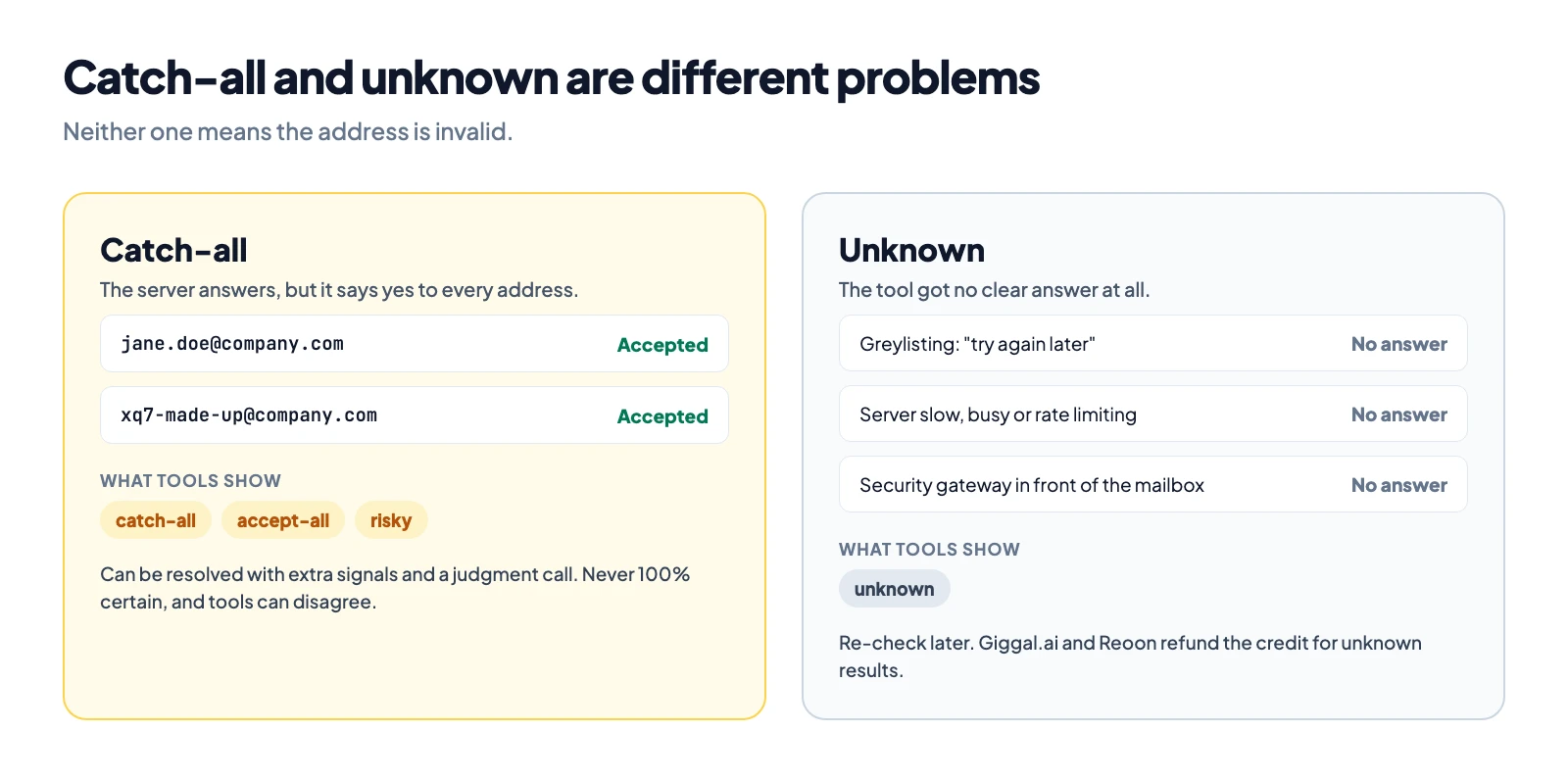
Two of these labels cause most of the confusion: catch-all and unknown. They sound alike, but they are different problems.
Catch-all is a domain setting, not a result about the address
Some company mail servers accept mail for every address on the domain, real or made up. Ask the server about a real employee and it says yes. Ask about a name you invented and it says yes to that too. That domain is catch-all.
Every email verification tool detects this the same way: it tests a made-up address, and if the server accepts it, the domain is catch-all. That part is easy. What tools return next is not one shared word. You will see one of three labels, depending on the tool:
- catch-all
- accept-all
- risky
All three mean the same thing: the domain accepts everything, so the normal mailbox check cannot tell a real address from a fake one. None of them means the address is bad. On business lists, many catch-all addresses belong to real people. Our post on what "risky" means in email verification goes deeper on that label.
Can you verify a catch-all email address?
Yes, but not with a single yes or no from the server, because the server will say yes to anything. There is no straightforward step that proves a mailbox on a catch-all domain exists.
What a verifier can do is collect other signals about the address and the domain and weigh them. Each tool that does this uses its own set of signals and its own rules for weighing them. Then it makes a judgment call: valid or invalid.
Three things follow from that, and you should know them before you trust any catch-all result:
- It is never 100% certain. A catch-all result is a judgment, not a confirmation from the server.
- Two tools can disagree on the same address. One tool can mark a catch-all address valid while another marks it invalid, because they read different signals. Neither is lying. They made different calls.
- Most tools do not try. The large majority stop at the catch-all, accept-all or risky label and leave the decision to you. Only a few tools resolve catch-all addresses into valid or invalid. Giggal.ai does, and so does BounceBan.
If your list is mostly business contacts and a large share comes back catch-all, a tool that resolves catch-all addresses is the difference between using those leads and throwing them away. Our catch-all verification page shows how Giggal.ai handles it.
Unknown means the tool could not answer
Unknown is not a result about the address either. It is the tool saying: we could not get an answer this time. The address may be perfectly good.
There is no single reason for unknown. Common ones:
- Greylisting. The server rejects new senders for a few minutes on purpose and accepts them on the second try. A verifier that does not retry later gets no answer.
- The server is slow, busy or down. The check times out.
- Rate limits. The server allows only so many checks from one source and stops answering after that.
- The verifier's own servers are blocked by that provider.
- A security gateway sits in front of the mailbox. This is one of the most common reasons on business domains, and it gets its own section below.
Because unknown means "no answer", not "bad address", some tools refund the credit when they return it. Giggal.ai refunds credits for unknown results. Reoon does the same, according to its support team. Other tools may charge for it, so check before you buy credits.
What to do with unknown addresses: do not delete them as if they were invalid. Re-check them later, which solves greylisting and busy servers. If they stay unknown, the cause is usually a gateway, and you need a tool that can get past it.
Why a security gateway blocks the answer
Many companies do not let mail reach their mail server directly. A secure email gateway (SEG) sits in front of it and filters every message first. Proofpoint, Mimecast and Barracuda are common examples. The gateway's job is to stop spam and attacks, so it does not tell outsiders which mailboxes exist.
To a verifier, that looks like one of two things. The gateway accepts every address at the door, so the result looks like catch-all. Or the gateway answers with a code that is about its own policy, not about the mailbox, so the result is unknown. Either way, the normal handshake gets no real answer about the address.
There are several kinds of gateways, and they behave differently. Our guide on how to verify emails behind secure email gateways covers them one by one. Few tools can get a real answer behind a gateway. Giggal.ai and BounceBan are two of them. Doing it needs extra checks beyond the handshake, run from sending servers with a good reputation, which brings us to cost.
Can you verify an email address for free?
You can check the spelling and the MX records for free. You cannot reliably check whether a mailbox exists for free, at any real volume. Here is why.
You cannot do it from your own computer. Many home internet providers block outgoing connections on port 25, the port mail servers use to talk to each other. Cloud hosts block or limit it too: Google Cloud blocks outbound port 25, Amazon Web Services restricts it by default, and Microsoft Azure blocks it on most subscription types.
Even with port 25 open, your IP address needs a good reputation. Mail servers judge who is asking. A new or unknown IP that checks many addresses looks like a spammer harvesting addresses. Servers slow it down, reject it, or put it on a blocklist. Then every answer you get is wrong or missing.
One IP is not enough. Providers limit how many checks they accept from one IP. A real verifier runs checks from many IP addresses, each kept in good standing, and spreads the work across them. Getting past gateways and resolving catch-all addresses adds more checks on top of the handshake.
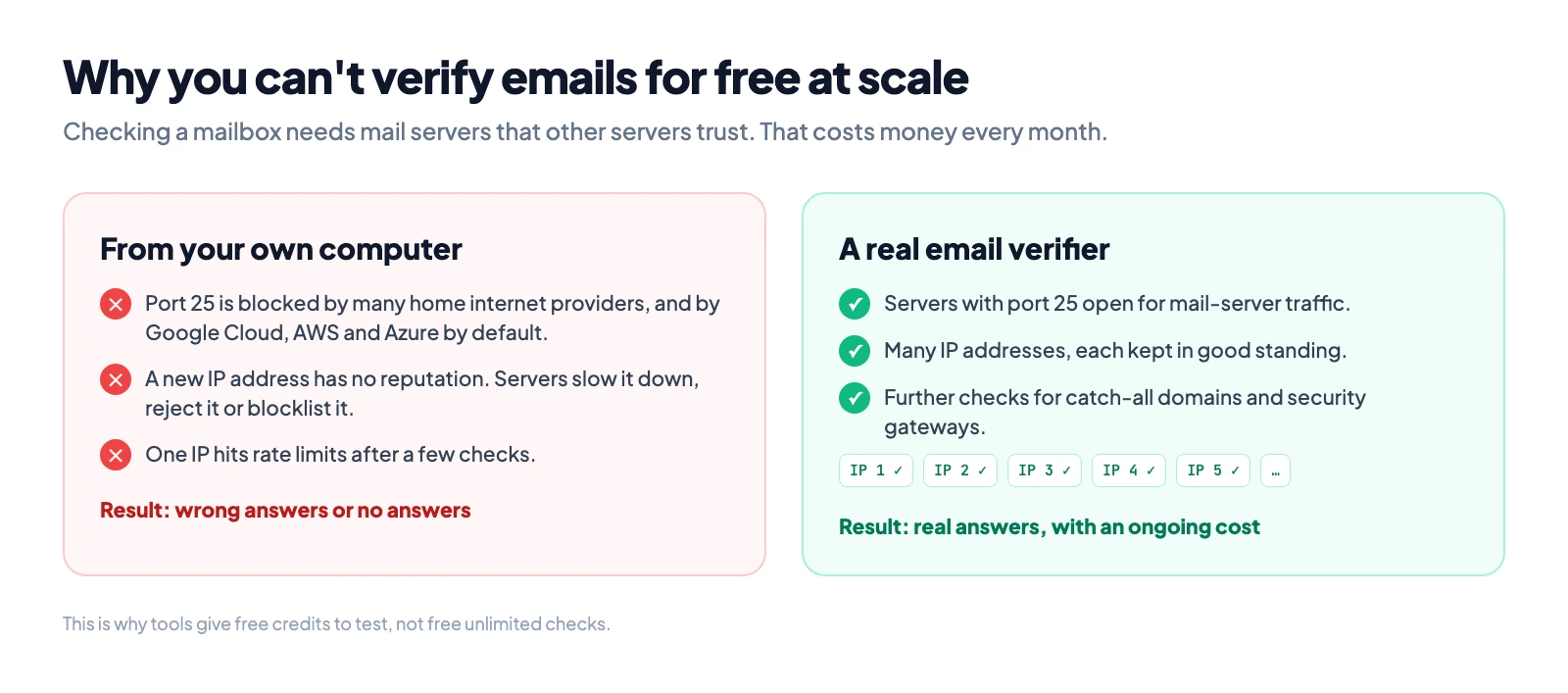
All of that is servers, IP addresses and ongoing upkeep, and it costs money every month. So no tool can verify large numbers of emails for you for free. What tools do offer is free credits to test them. Many give a small number, from a handful up to a few hundred. Giggal.ai gives 1,000 free credits with no card needed, and lets you check single addresses without signing up.
Why you should not send a test email
Sending a message and waiting to see if it bounces does work, in a way. It is also the worst way to check.
- Every bounce counts against your sending domain. Gmail, Outlook and other providers track your bounce rate, and too many bounces push your mail toward spam, including mail to real people.
- If the address does exist, the person gets an empty or odd message from you before your real one.
- On catch-all domains and behind gateways, the message may be accepted first and bounced later, or dropped without any bounce. So silence still does not prove the address is good.
Quick checks you can do by hand, and what they prove
These are fine for one address when you have no tool at hand. None of them is reliable enough for a list.
| Check | How | What it proves | What it misses |
|---|---|---|---|
| Search the address | Put it in quotes in a search engine | The address appears on a public page | Most real addresses are not public |
| Password reset page | Enter the address on the provider's "forgot password" page | Sometimes, whether an account exists | Many providers now hide this to stop account guessing, so no message proves nothing |
| Hover in Gmail | Type the address in a new Gmail message and hover over it | A photo or name means it is tied to a Google account | Says nothing about addresses outside Google |
| MX lookup | Look up the domain | The domain can receive mail | Says nothing about the mailbox |
Valid, but it still bounced. Why?
A valid result means the mailbox existed and accepted mail at the moment of the check. Mail can still bounce later:
- The check is old. People change jobs and accounts close. A list checked months ago is out of date. Check close to the time you send.
- The mailbox is full or temporarily unavailable. That is a soft bounce, and it often clears.
- The server rejected your sender, not the address. If your domain or IP has a poor reputation, or your SPF, DKIM or DMARC records are broken, a real mailbox can still refuse your mail. Our SPF checker helps you check your own setup.
- It was a catch-all judgment. A catch-all result is a judgment based on signals, so a small share can still bounce.
What verification cannot tell you
A verifier tells you whether a mailbox exists and accepts mail. It cannot tell you:
- Who owns the address
- Whether the person reads it or still uses it every day
- Whether the person wants your email
If you need to know who is behind an address, for example a new contact or a suspicious signup, you need other checks: their company website, a public profile that lists the address, or a confirmation email they have to click.
Is the email you received real?
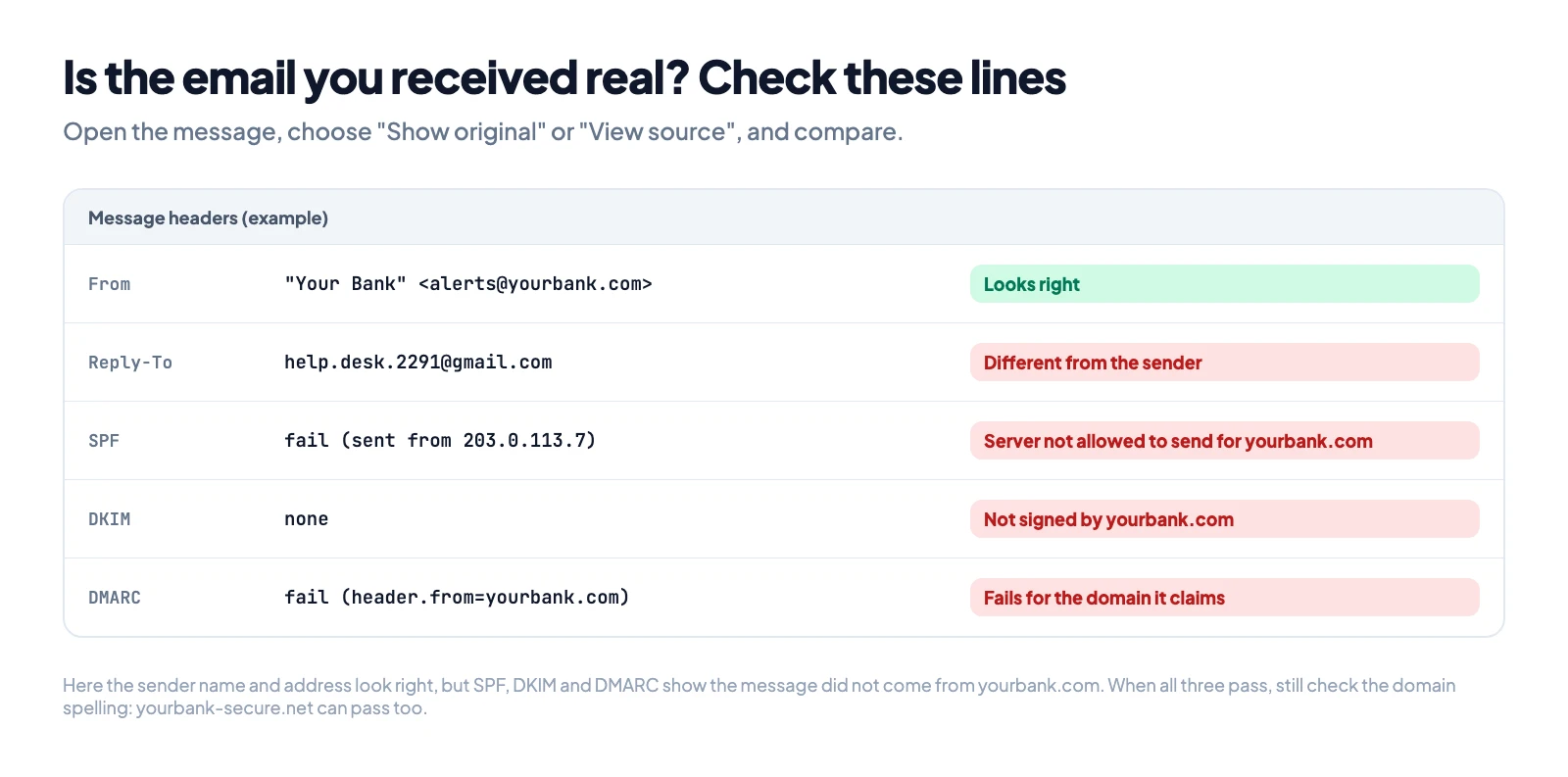
Sometimes "verify an email address" means checking a message you received, not an address you want to send to. That is a different check:
- Look at the full sender address, not only the display name. "PayPal Support" can come from any address.
- Compare the reply-to address with the sender. A different domain is a warning sign.
- Check the domain spelling: paypa1.com is not paypal.com.
- Read the authentication results in the message headers. Most mail apps have a "show original" or "view source" option. Look for SPF, DKIM and DMARC results. A fail on a message that claims to be from a big brand is a strong sign of a fake.
How to verify a whole email list
For a list, checking by hand is not practical. Upload the list as a CSV or Excel file to a bulk email verifier and you get each address back with its result. Then:
- Remove invalid and disposable addresses.
- Keep valid addresses.
- Resolve catch-all addresses with a tool that can, instead of deleting them.
- Re-check unknown addresses later.
- Decide on role-based addresses by the type of email you send.
To check addresses as people type them, for example on a signup form, use an email verification API. It runs the same checks and returns the result in your app.
Frequently asked questions
Can you verify an email address without sending an email?
Yes. An email verifier asks the recipient's mail server whether the mailbox exists and stops before any message is sent. The owner of the address receives nothing.
Is it legal to verify an email address?
Checking an address does not send it anything, and it uses the normal way mail servers talk to each other. Under the GDPR, an email address can still be personal data, so you need a lawful reason to hold and use it, such as legitimate interest for B2B outreach.
How accurate is email verification?
On normal domains, a mailbox check is reliable, because the server gives a clear yes or no. Accuracy drops on catch-all domains and behind security gateways, where the result depends on how well the tool reads other signals.
What is the difference between catch-all and unknown?
Catch-all means the domain accepts every address, so the server's yes means nothing. Unknown means the tool got no answer at all, for example because of greylisting, a timeout or a gateway. Neither one means the address is invalid.
Should I send to catch-all addresses?
Not in bulk without resolving them first. A tool that resolves catch-all addresses tells you which ones are likely valid. If your tool only labels them, send to them in small batches and watch your bounce rate.
Why do two tools give different results for the same address?
On normal domains they usually agree. On catch-all domains and behind gateways, each tool uses its own signals and its own rules, so they can reach different answers on the same address.
How often should I re-verify my list?
Before each campaign if the list has not been checked recently. Addresses stop working as people change jobs and close accounts, so a list that was clean a few months ago can bounce today.