
Best Email Verification Software in 2026, Tested
The short version
This is a test of six email verification software options on the addresses that break most verifiers. For the full ranked list of 28 tools by catch-all handling, SEG support and price, see the full comparison of 28 verifiers.
The hardest part of choosing an email verification tool in 2026 is catch-all and SEG-protected addresses. Around 30% of a B2B email list sits on catch-all (also called accept-all) or SEG-protected domains, the two cases where a mail server will not tell a verifier whether a mailbox really exists. On catch-all domains the server accepts every address, so verifiers return Risky. On SEG-protected domains a security gateway hides the real server, so verifiers return Unknown. This guide explains catch-all and SEG email verification from the ground up, then compares the six best email verifiers of 2026 on whether they actually resolve these addresses or only flag them. It answers the real question: is there a genuine way to verify catch-all and SEG-protected emails, and if so, why doesn't every tool do it? The answers will help you pick the verifier that fits your own list.
First, what a verifier actually asks
Email verification is one simple question asked of the receiving mail server: will you accept mail for this exact mailbox?
On an ordinary domain the server answers honestly. Ask about a real mailbox and it accepts, ask about one that does not exist and it rejects with a "no such user" response. From that answer, the tool returns a clean result: Valid or Invalid.
Catch-all and SEG-protected domains are the two setups where the server refuses to give a straight answer. They fail for different reasons and produce different results, and the rest of this guide is about telling them apart.
1. What a catch-all domain is
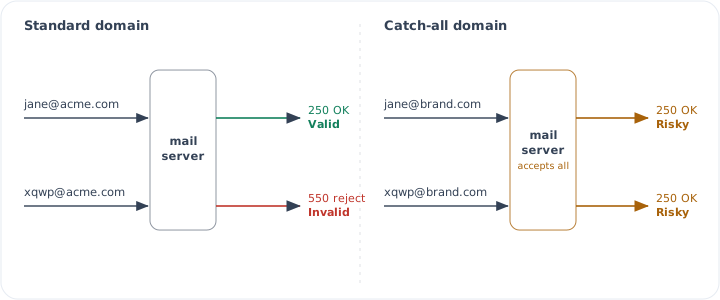
A catch-all (also called accept-all) domain is configured to accept mail sent to any address at that domain, whether the mailbox exists or not. It then sorts, forwards, or quietly discards the mail internally.
Say a company runs brand.com as catch-all. Send to a real mailbox, a department alias, or a straight typo: jane@brand.com, sales@brand.com, and xqwp@brand.com are all accepted.
All three are accepted. Businesses do this on purpose so they never lose a message to a misspelled address, and it is common on Google Workspace and Microsoft 365 domains. The side effect is that a verifier can no longer prove any single mailbox exists.
Why tools mark catch-all as Risky, not Unknown. The server does answer, it just answers "accepted" to the real mailbox and the typo alike. The verifier gets a response but no way to tell the two apart, so both addresses are flagged Risky. To send them, either it will bounce or it will not, and the tool leaves that call up to you.
A detailed guide on this topic can be found here: What is a catch-all email address.
2. Why catch-all matters for your list
On a typical B2B list, around 30% of contacts sit on catch-all or SEG-protected domains. Marked Risky, they hand you a bad choice:
- Delete them, and you throw away real, reachable buyers hiding inside those domains.
- Keep and send, and the dead addresses among them bounce, which drags down your sender reputation and inbox placement.
That is the whole problem. A tool that leaves 30% of your list flagged has not finished the job, it has handed the hardest part back to you. The tools worth paying for are the ones that go a step further and resolve those addresses to a real Valid or Invalid by confirming whether the mailbox itself exists, even on a domain that accepts everything.
3. What a Secure Email Gateway (SEG) is
A Secure Email Gateway is a security layer that sits in front of an organization's real mail server and filters every inbound message for spam, phishing, and malware before it reaches a mailbox. The organization points its domain's MX record at the gateway, so all mail flows through the SEG first and only clean mail is passed through to the actual server.
Who deploys one, and why some domains have it and others do not
A SEG is deployed by the receiving organization's IT or security team. Enterprises, and any organization handling sensitive data, finance, healthcare, legal, and government, almost always run one. A small startup on plain Google Workspace usually runs none. That is the entire reason some addresses are SEG-protected and others are not: it depends on whether the company on the other end put a gateway in front of its mail. It has nothing to do with the individual address.
How to tell if a domain is behind a SEG
You can usually read it straight off the MX record. If a domain's mail exchangers point to a known gateway provider, that domain is SEG-protected.
| Secure Email Gateway | Vendor | MX fingerprint | Typically deployed by |
|---|---|---|---|
| Proofpoint | Proofpoint | *.pphosted.com | Enterprise, finance, healthcare |
| Mimecast | Mimecast | *.mimecast.com | Mid-to-large enterprise, legal |
| Barracuda | Barracuda | *.barracudanetworks.com | SMB to mid-market |
| Secure Email | Cisco (IronPort) | *.iphmx.com | Large enterprise, telecom |
| Defender for O365 | Microsoft | *.mail.protection.outlook.com | Any Microsoft 365 organization |
| Email Security.cloud | Broadcom (Symantec) | *.messagelabs.com | Enterprise |
| FortiMail | Fortinet | varies by install | Fortinet-standardized IT |
| Sophos Email | Sophos | *.sophos.com | SMB to mid-market |
Fingerprints are the common patterns, some organizations relay through a SEG without an obvious MX name, so the record is a strong hint, not proof.
Why tools mark SEG-protected emails as Unknown. The gateway intercepts the connection and never reveals whether the mailbox behind it exists. With no usable answer from the real server, a standard tool has nothing to score, so it returns Unknown. Instead of a clean 250 (exists) or 550 (no such user), the gateway tends to hand back temporary or evasive replies that neither confirm nor deny the mailbox, for example: 451 4.7.1 greylisted, 421 service not available, 450 4.2.1 mailbox temporarily unavailable, or the connection simply times out.
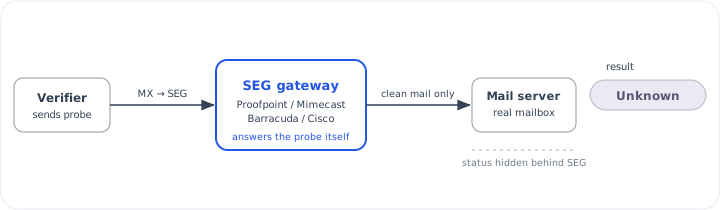
Because the gateway shields the mailbox, verifying a SEG-protected address takes more than a standard check. A tool either has a way to confirm the mailbox behind the gateway, or it gives up and returns Unknown. That capability is exactly what separates the tools below.
4. Is there a way to verify catch-all and bypass SEG?
Yes, but it only became possible in the last few years. To understand how, it helps to look at how tools used to do it.
Before 2023
Before 2023, verifying a catch-all address was mostly a mystery, and most people did not even know Secure Email Gateways existed. Almost every tool relied on the same method: an SMTP check, often called an SMTP ping.
It works like this. The tool connects to the receiving mail server and starts the steps of sending a message: HELO, MAIL FROM, then RCPT TO with the address it is checking. It reads the code the server replies with and stops there, without sending anything. That reply code is what the tool uses to decide whether the address is valid.
Most tools only looked for one code: 250, which means the server accepted the recipient. If they saw 250 they marked the address valid, and if they saw anything else they marked it invalid. A lot of bounces came from exactly this, because 250 is not the only code, and it does not always mean the mailbox exists. A few other codes matter:
- 250: Accepted. The mailbox will receive mail, but a catch-all server says this to every address, real or fake.
- 251 / 252: Accepted for forwarding, or cannot verify but will try to deliver. Ambiguous, not a clean yes.
- 450 / 451 / 452: Temporary failure from greylisting, throttling, or a busy server. Try again later. Naive tools misread these as invalid.
- 421: Service not available right now. Temporary, not a real answer about the mailbox.
- 550: No such user. The mailbox genuinely does not exist.
- 551 / 553: User not local, or the address is not allowed.
- 552: Mailbox full or over quota.
Treating this as "250 means good, anything else means bad" causes two problems. A catch-all server replies 250 to every address, real or fake, so a 250 does not prove the mailbox exists, and tools that trusted it sent dead addresses into campaigns. Greylisting replies with a temporary 4xx on the first try and then accepts on a later try, so tools that read that 4xx as invalid dropped good addresses, and tools that read it as unknown gave up on them.
So the SMTP check worked fine on ordinary domains but struggled on catch-all and gateway-protected mail. There is also a second issue most tools overlook: the answer you get depends on the IP address you are checking from.
Why IP infrastructure matters
When a tool connects to a mail server, the server looks at the IP address it is connecting from before anything else. If the IP has a good reputation, the server responds normally. If the IP is new, unknown, or already on a blocklist, the server may reply with a temporary 4xx, block the connection, or give an answer that has nothing to do with whether the mailbox exists.
This is why the same email can come back Valid on one tool and Risky or Unknown on another. The address is the same. The tools just connected from different IPs, and the server treated each one differently.
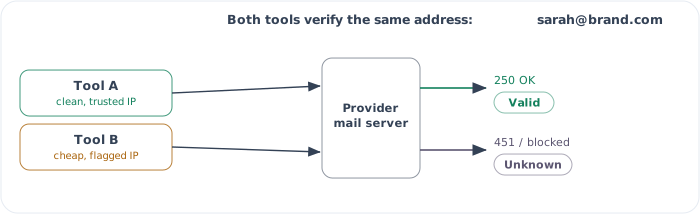
A good IP is what gets an accurate answer from the server. Keeping a pool of good IPs is expensive. They need proper reverse DNS, a clean sending history, monitoring, and replacing as soon as one gets flagged. A tool with reputation and resources can run that kind of infrastructure. A cheaper tool running on a few low-quality IPs cannot, and its results are less reliable because of it. So comparing tools is not only about the method they use, it is also about whether the mail server trusts the IP they check from.
So how do the newer tools do it?
After 2023, some tools found ways to verify catch-all mailboxes and get past SEG gateways. Explaining the actual methods would need its own dedicated post, but it is worth saying what they are not.
They are not naming patterns, like assuming first.last@ exists. They are not an AI guess. They are not a large database of addresses, and they are not your past verification history. None of those can answer the real question: does this mailbox exist right now, at the moment you check it.
What works is finding a loophole in how the major providers respond, a way to get past the catch-all flag and the gateway and see whether the mailbox is actually there.
If there is a way to do this, why doesn't every tool do it? Because it is not a fixed, reliable rule. It is a big step, and these loopholes can close at any time. If a provider changes how it responds, the method can stop working and the whole setup hits a dead end, so the tool has to find another way. That is why several large tools, like NeverBounce and Reoon, have not taken this step yet.
And even the tools that do it cannot promise perfect results. No tool can honestly guarantee even 90% accuracy on catch-all and SEG verification, because these methods still depend on the IP and its reputation. However you get there, you still have to reach the email provider's server in the end, and that server still judges you by the IP you connect from.
So the tools worth choosing are the ones that do both: a method that works on the hard addresses, and the IP infrastructure to make the result reliable. That is what the comparison below looks at.
5. How the 2026 email verification tools compare, and how to pick the best one
Every tool on this list already does the basics well: syntax checks, disposable and role-based detection, catch-all detection, a REST API, and third-party integrations. Those are standard across the category, so they are not what decides anything. I shortlisted and compared the six on the points that actually change your results and your cost:
- Accuracy they claim
- Bounce rate or guarantee they offer
- Whether they verify catch-all addresses or only flag them
- Whether they can verify behind a SEG
- Whether you can use them inside AI tools like Claude and ChatGPT over MCP
- Their customer rating on G2 and Trustpilot
- Starting price
Capabilities at a glance.
| Tool | Catch-all | SEG bypass | AI (MCP) | Rating (G2 · Trustpilot) |
|---|---|---|---|---|
| Giggal.ai | Yes | Yes | Native (Claude + ChatGPT) | 4.8 · 4.1 |
| BounceBan | Yes | Yes | Official MCP | 4.8 · 3.1 |
| ZeroBounce | Partial | Yes | Official MCP | 4.7 · 4.8 |
| MillionVerifier | Partial | No | Via Apify | 4.2 · 4.1 |
| Reoon | Detection only | No | No | 4.8 · None |
| NeverBounce | Partial | No | No | 4.1 · 2.0 |
Accuracy and pricing.
| Tool | Accuracy | Bounce policy | Starts at |
|---|---|---|---|
| Giggal.ai | 98.5% | Under 3% | 1,000 free, $9.90/10k |
| BounceBan | 97%+ | Under 3% | 100 free, ~$34/10k |
| ZeroBounce | 99.6% | No claim | 5 free/mo, $129 one-time, or $99/month (ZeroBounce ONE) |
| MillionVerifier | 99% | Refund if >4% | 500 free, $39/10k |
| Reoon | 99% | Refunds unknowns | 600 free +20/day, $12/10k |
| NeverBounce | 97-99% | Under 2% | 10 free, $8/1k |
Giggal.ai
Built for the hard addresses. It checks whether the mailbox exists on catch-all, accept-all, and SEG-protected domains, returning a real valid or invalid where most tools stop at risky or unknown. It reports 98.5% accuracy across more than 500 million emails verified, and keeps bounce rates under 3%. It refunds credits for the Unknown flag. It connects through a REST API and runs natively inside Claude and ChatGPT over MCP with no config files. Credits never expire as per their pricing policy, and it holds a strong 4.8 rating on G2.
Integrations: HubSpot, Mailchimp, ActiveCampaign, SendGrid, Zapier, and n8n, plus 80+ more and AI clients (Claude, ChatGPT, Cursor, VS Code, and more) over MCP.
Pricing: 1,000 free, then $9.90 / 10,000
BounceBan
Focused on the same hard cases as Giggal. It claims 97%+ overall accuracy and 85 to 95% on catch-all, greylisted, and SEG-protected addresses, all in real time without sending mail. It offers an official MCP server for AI clients. Pay-as-you-go credits roll over and do not expire, and it holds a strong 4.8 rating on G2.
Integrations: Google Sheets, Clay, n8n, a Claude Code plugin, and a ChatGPT GPT, on top of its REST API.
Pricing: 100 free, ~$34 / 10,000
ZeroBounce
A mature, full-suite platform with 99.6% claimed accuracy and a 5x-refund guarantee, though that guarantee only covers addresses it marks valid, not catch-all or unknown. It gives catch-all addresses an AI score from 1 to 10 rather than confirming each mailbox, and says it can recognize and classify many domains behind gateways like Proofpoint and Mimecast. It offers an official MCP server for Claude, Cursor, and VS Code, plus 60+ integrations. It carries the highest public ratings here, G2 4.7 and Trustpilot 4.8, and sits at the premium end on price.
Integrations: 60+ native, including HubSpot, Salesforce, Mailchimp, Constant Contact, MailerLite, AWeber, Zoho CRM, Shopify, and WordPress, plus Zapier.
Pricing: 5 free/mo, $129 one-time, or $99/month (ZeroBounce ONE)
MillionVerifier
Before 2023 it was the only cheapest option at scale, with one million credits for $449 and credits that never expire. After 2023 BounceBan and Giggal launched with much better pricing. Its Catch-All Verifier resolves roughly 30 to 40% of accept-all addresses and marks the rest Risky, and it does not verify behind a SEG. It backs results with a refund if hard bounces pass 4% and does not charge for catch-all or unknown results. An MCP server is available through Apify.
Integrations: Mailchimp, HubSpot, ActiveCampaign, Salesforce, ConvertKit, and Intercom among 30+, plus Zapier and Make, with EverClean daily auto-cleaning.
Pricing: 500 free, $39 / 10,000
Reoon
Fast, low-cost bulk verification with 99% claimed accuracy. It detects catch-all domains and flags them but does not resolve the individual mailbox, and it does not handle SEG-protected addresses. It refunds credits for the Unknown flag. There is no MCP or AI-client access. It has one of the cheapest entries in the category, with a free daily allowance and lifetime credit packs.
Integrations: Mailchimp, HubSpot, Salesforce, SendGrid, and ActiveCampaign, via Zapier, Make, Pabbly Connect, Albato, and a WordPress plugin.
Pricing: 600 free + 20/day, $12 / 10,000
NeverBounce
A dependable standard verifier with a real-time API and a bounce-back guarantee that refunds the credit if a verified address bounces. It resolves only a small share of catch-all addresses (8% in LeadMagic's test) and flags the rest, and it does not verify behind a SEG. There is no MCP. Per-email pricing starts around $0.008 and drops to roughly $0.003 at high volume.
Integrations: Mailchimp, HubSpot, Marketo, Salesforce Marketing Cloud, Drip, Campaign Monitor, iContact, and MailerLite, plus Zapier.
Pricing: 10 free, $8 / 1,000
Conclusion
If your lists are mostly ordinary domains, any dependable verifier here will do the job. Most B2B lists are not. Around a third of your contacts sit on catch-all or SEG-protected domains, and those are the ones that quietly bounce and cost you sender reputation. For those lists you need a tool that resolves the hard addresses instead of flagging them and handing the decision back to you.
So the test is simple. Take a sample of your own list, run it through the tools you are weighing, and keep the one that turns the most of those hard addresses into a clear result without bouncing. For catch-all and SEG-heavy lists that shortlist is short, and Giggal.ai is on it.