
How Long to Warm Up an Email Domain Before a Campaign
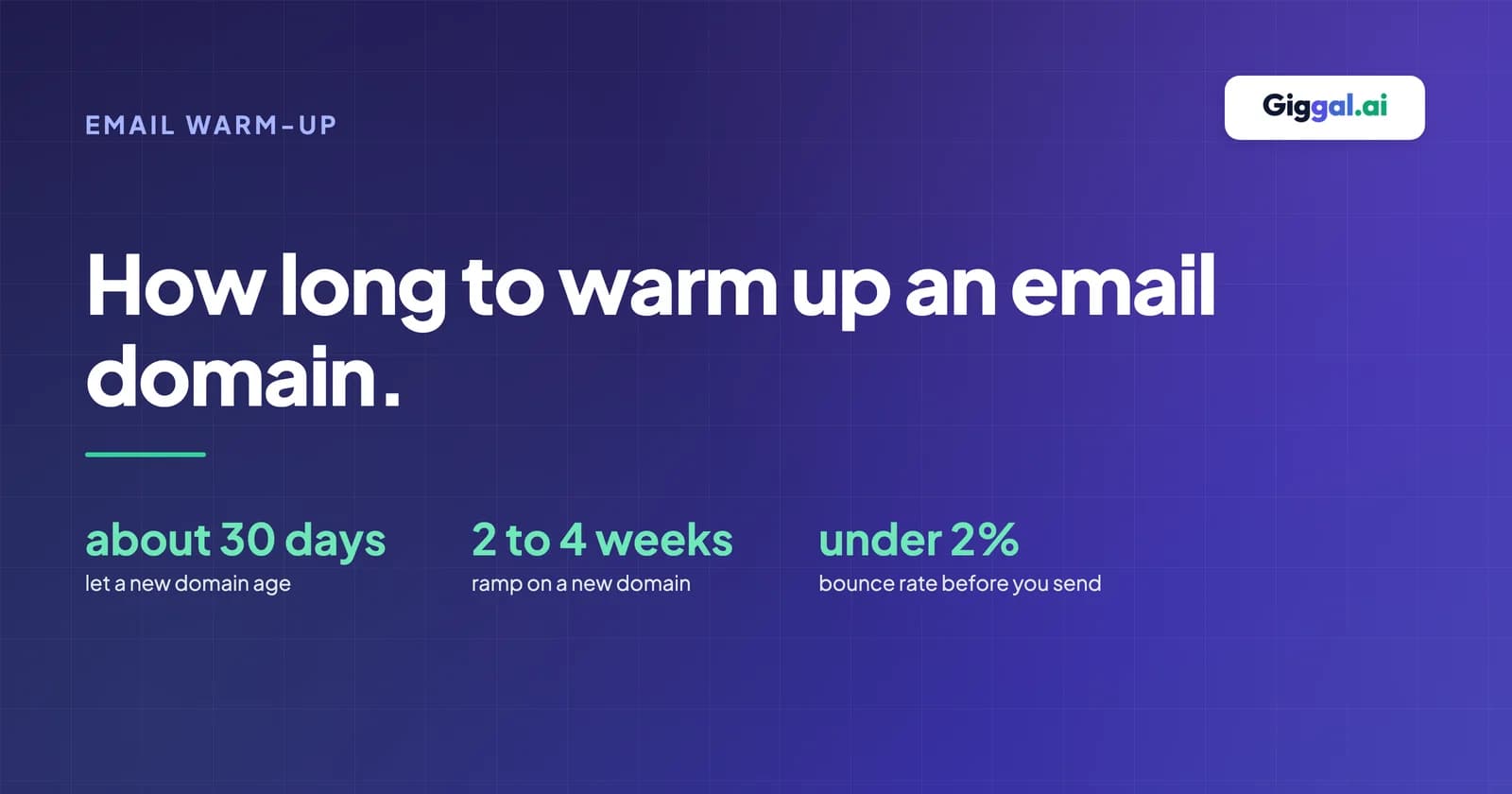
A new email domain needs about 2 to 4 weeks of warm-up before a real campaign, and that clock should start only after the domain has aged for a few weeks. A new mailbox on a domain that already sends normal business mail is usually ready in about 2 weeks. If you are asking how long to warm up an email domain before a campaign, those are the planning numbers. Your own bounce and complaint rates then decide when you are actually ready.
No mailbox provider publishes an official warm-up length. Google, Microsoft and Yahoo do not give a number of days for email sent from normal mailboxes. The figures you see online, from 14 days to 12 weeks, come mostly from companies that sell warm-up tools. This guide shows what each timeline is based on, so you can pick the right one for your situation.
If you need the basics of what warm-up is first, start with our email warm-up glossary entry.
How long to warm up an email domain, by situation
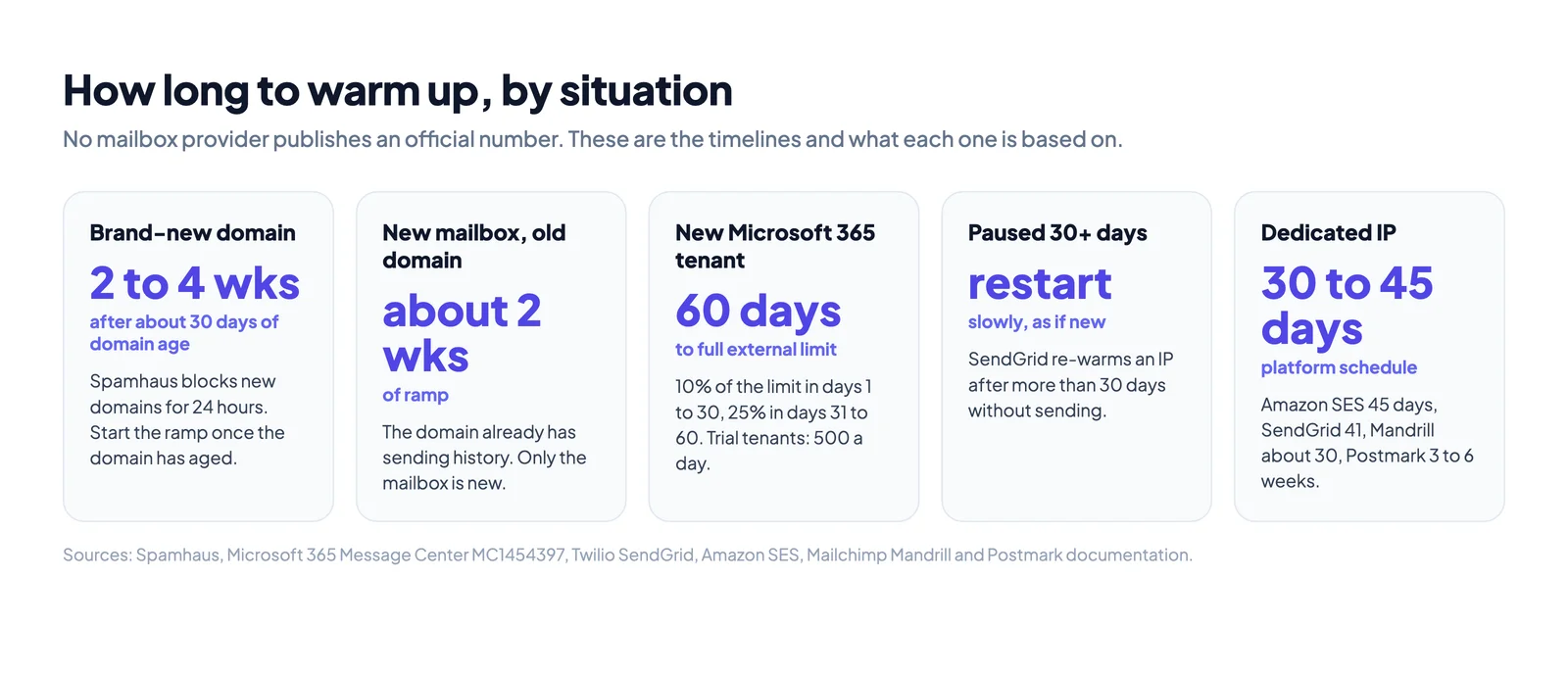
The right length depends on what is new: the domain, the mailbox, the account with your email provider, or the sending IP.
| Situation | Plan for | What it is based on |
|---|---|---|
| Brand-new domain, new mailboxes | Let the domain age about 30 days, then 2 to 4 weeks of ramp | Spamhaus blocklists newly registered domains for their first 24 hours. Deliverability writer Al Iverson advises a domain at least 30 days old before warm-up. |
| New mailbox on a domain that already sends normal mail | About 2 weeks of ramp | The domain already has sending history. Only the new mailbox's volume is new. |
| New Microsoft 365 account (tenant) | 60 days before your full external sending limit | Microsoft is reducing the external recipient limit to 10% in a tenant's first 30 days and 25% in days 31 to 60. Trial tenants drop to 500 external recipients a day. |
| Domain coming back after a pause | Restart slowly, as if new | Twilio SendGrid says to warm up an IP again after more than 30 days without sending. |
| Dedicated IP on an email platform | 30 to 45 days, following the platform's schedule | Amazon SES ramps over 45 days, Twilio SendGrid over 41 days, Mailchimp's Mandrill over about 30 days. Postmark expects 3 to 6 weeks. |
The Microsoft 365 limits matter most for teams that set up a new tenant just for outreach. Microsoft announced the change in August 2026 and is rolling it out between mid-September and the end of November 2026. Until a new tenant is two months old, it cannot send at full external volume, whatever your warm-up tool says.
Why the numbers online disagree
Search for this question and you will find 14 days, 3 weeks, 30 days minimum, 4 to 6 weeks and 45 days. There are three reasons for the spread.
First, there is no official number to copy. Google's sender guidelines tell senders to "start with a low sending volume to engaged users, and slowly increase the volume over time." They do not say for how long. Yahoo's sender best practices do not cover ramping at all.
Second, some figures are quoted from sources that do not contain them. A few guides credit Microsoft with a "4 to 8 weeks" timeline and a rule of raising volume 1.5 times per step. We could not find either figure on any Microsoft page. The only ramp period Microsoft publishes is for its Azure Communication Services email product: "two to four weeks."
Third, most of the pages that rank for this question belong to companies that sell warm-up tools. A longer recommended period also means more weeks of paid subscription.
Real sender behavior is much shorter than the advice. Smartlead analyzed more than 850 million emails sent through its platform in the first half of 2026. It found that "the average sender warms up a new mailbox for 8 days before its first campaign, down from 9.4 days a year earlier." Smartlead itself notes that this is what senders do, not a proven safe minimum.
What decides how long your warm-up takes
Five things affect the timeline.
Domain age. A domain registered this week has no history at all. Spamhaus adds newly registered and previously dormant domains to a blocklist for their first 24 hours, and some receiving servers use that list. Buying your outreach domains a month before you need them costs nothing and removes this risk.
How much you need to send. Google says "the more email that you send, the more slowly you should increase sending volume." A team that needs 30 emails a day from one mailbox finishes far sooner than a team that needs 3,000.
How often you send. Google also says you can "increase the sending volume more quickly when you send daily instead of weekly." A domain that sends a little every weekday builds history faster than one that sends in weekly bursts.
Which providers your recipients use. Mail to Gmail, Outlook.com and company servers is judged separately. Amazon SES notes that with some providers "you can establish a positive reputation in around two weeks, while for others it may take up to six weeks."
List quality. Bounces and spam complaints during warm-up push the timeline back, sometimes by weeks. This is the factor most teams can control directly, and we cover it below.
A day-by-day warm-up schedule
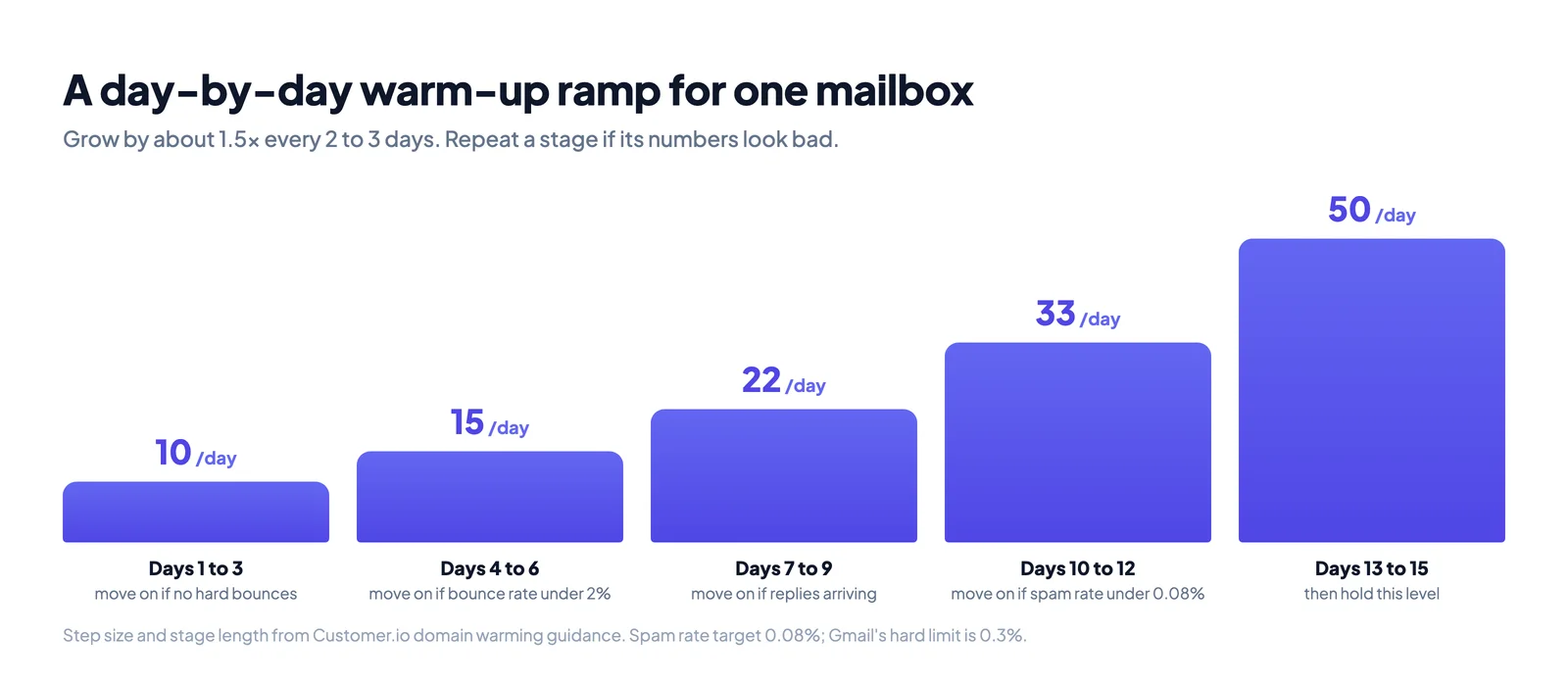
A safe ramp grows in small steps and holds each step long enough to see results. Customer.io's domain warming guide uses steps of about 1.5 times the previous volume, with each stage lasting 2 to 3 days. Here is that pattern for one mailbox aiming at 50 cold emails a day.
| Days | Emails per day | Move on only if |
|---|---|---|
| Before day 1 | Domain aged, SPF, DKIM and DMARC set up, real mail flowing | Authentication passes on a test email |
| 1 to 3 | 10 | No hard bounces, no spam complaints |
| 4 to 6 | 15 | Bounce rate under 2% |
| 7 to 9 | 22 | Replies are arriving, no deferrals |
| 10 to 12 | 33 | Bounce rate under 2%, spam rate under 0.08% |
| 13 to 15 | 50 | Same as above, then hold this level |
Send to your most engaged contacts first. Google's guidance is to start "to engaged users," which in practice means people who know you, existing customers and recent replies.
Two rules make the schedule work. If a stage looks bad, repeat it instead of moving on. And send every working day. Mailgun points out that its warm-up limits assume daily sending: if you stop, "you cannot pick back up with the limit for day eight."
If you need more than 50 emails a day, add more warmed mailboxes rather than pushing one mailbox harder.
How to know your domain is ready
A domain is ready when its numbers stay healthy while volume goes up. Check these before your first real campaign:
- Bounce rate under 2%. Customer.io says bounce rates above 2% "indicate list hygiene problems that you should resolve before advancing." Our cold email bounce rate guide explains the bands.
- Spam complaint rate under 0.08%. That is Customer.io's warm-up target. Google's hard limit for Gmail is 0.3%, so staying far below it gives you room for mistakes.
- No rate-limit errors. If Gmail returns the code 421 4.7.28, it has "detected an unusual rate of email" from you. Slow down. Google's advice is to reduce volume until errors stop, "then, increase slowly again."
- Authentication passes. Send a test to a Gmail account, open "Show original" and check that SPF, DKIM and DMARC say PASS. Our SPF, DKIM and DMARC guide covers each record.
- Real replies are coming in. Replies from real people are a better sign than any score in a dashboard.
Google Postmaster Tools can help, with one limit. Its Compliance status dashboard is open to all senders. But Google says data may be missing "on days when outgoing email volume is low," which is exactly the situation during warm-up. Do not wait for Postmaster Tools to fill in before you trust your own bounce and complaint numbers.
Do warm-up tools make it faster?
Automated warm-up tools send emails between a network of mailboxes. The emails are opened, replied to and moved out of spam automatically. The idea is to give your domain positive engagement before your real campaign starts.
The evidence that this shortens warm-up is weak:
- Google does not use opens. Its sender guidelines say: "Google doesn't track open rates."
- Synthetic engagement may not count. Customer.io, an email platform, states that "inbox providers detect synthetic engagement and don't extend any reputation credit for it," and does not support these services.
- Warm-up mail lands differently from real mail. Smartlead's own data shows warm-up emails reach the inbox about 99% of the time. Smartlead adds that this is placement for warm-up emails, "not cold campaigns."
- Google has pushed back before. GMass, an email tool, says that in fall 2022 Google told it to turn off its warm-up system or lose access to the Gmail API.
Google and Microsoft have published no specific rule about warm-up tools. If you use one, treat its inbox score as a tool metric, not proof that your campaign will reach the inbox. Real conversations with real contacts build the history that counts.
The part warm-up cannot fix: your first campaign list
One bad send can undo weeks of warm-up. The usual cause is the first campaign list. Lead lists age as people change jobs and companies close mailboxes. Send to a few hundred old addresses on day 16 and the bounce rate can jump well past 2%.
Bounces at that stage hit a domain that has only two weeks of history. There is not enough good history to balance them out. Google tells senders to cut volume when bounces rise, so the ramp has to start again.
So check the list before the first campaign, not after the bounces arrive:
- Run the list through an email checker or a full email list cleaning pass.
- Remove invalid, disposable and role-based addresses.
- Keep catch-all addresses in a separate, slower group. A catch-all domain accepts every address, so a basic check cannot tell you if the person exists. Catch-all verification can.
- Send the first campaign to the cleanest part of the list, then widen.
After warm-up: keep the volume steady
Warm-up does not end with a single switch to full volume. Google asks senders to "send email at a consistent rate" and to "avoid sending email in bursts." It gives a clear example of what not to do: "immediately doubling previously sent volumes suddenly could result in rate limiting or reputation drops."
Amazon SES gives the same advice for its dedicated IPs: "You should avoid sending large volumes of email immediately after the warmup process is complete." Grow from your last warm-up level in the same small steps, and keep sending on a regular weekday rhythm.
Frequently asked questions
Can I warm up an email domain in 7 days? You can start sending small amounts after a week, and many senders do. Smartlead's data puts the average at 8 days. But a 7-day warm-up on a brand-new domain gives you very little history to absorb a bad send. If the domain is new, plan for at least 2 weeks of ramp after it has aged.
How many emails a day should I send during warm-up? Start at about 10 a day per mailbox and grow by about 1.5 times every 2 to 3 days, as in the schedule above. Hold at the level you need. Cold outreach guides commonly cap one mailbox at 30 to 50 emails a day.
Does an old domain need warm-up? Less, if it already sends normal mail every day. A domain that has been quiet for a month or more should be treated almost like a new one. Twilio SendGrid uses 30 days without sending as the point where an IP needs warming again.
Should I keep warm-up running after my campaign starts? Keep your sending steady and real. Warm-up tool vendors usually advise leaving a low level of warm-up running. Real replies and a clean list matter more than warm-up volume.
Does Google publish an official warm-up schedule? No. Google tells senders to start low with engaged recipients, increase slowly and avoid sudden spikes. It does not give a number of days.
Why are my emails bouncing during warm-up? Usually because of the list, not the warm-up. Check the addresses with an email checker and read why cold emails bounce in this guide.