
How to Check Your PHP Version and Update It
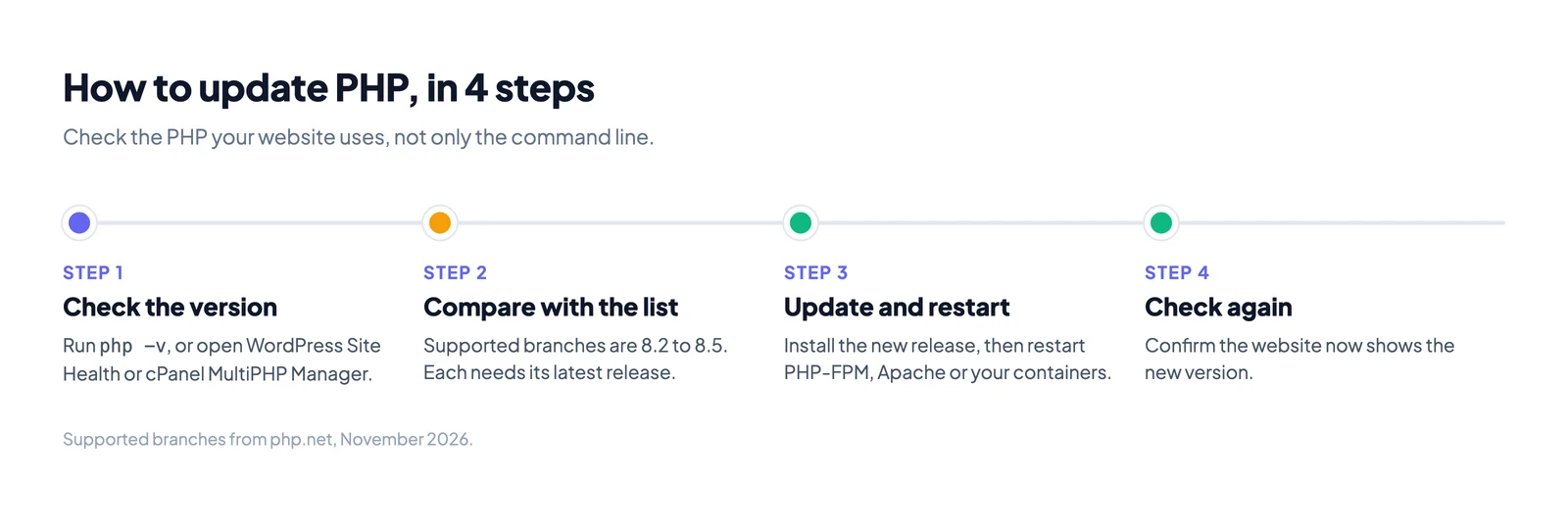
To check your PHP version, run php -v on the server. On WordPress, open Tools, then Site Health, then Info, then Server. On cPanel hosting, open MultiPHP Manager.
The version matters because old PHP does not get security fixes. In October 2026, the PHP2Shell bugs hit every supported PHP branch. Only servers on a fixed release were safe. This guide shows how to find your version, how to read it, and how to update it.
How to check your PHP version
Pick the method that matches where your site runs.
| Where your site runs | How to check the PHP version |
|---|---|
| Your own server (SSH) | Run php -v |
| WordPress | Tools, then Site Health, then Info, then Server |
| cPanel hosting | MultiPHP Manager lists the version for each domain |
| Plesk hosting | Open the domain's PHP settings |
| Any web server | A temporary phpinfo() page |
| Windows or macOS | Run php -v in Command Prompt or Terminal |
On the command line
Connect to the server and run:
php -vThe first line shows the version. For example, PHP 8.3.36 (cli) means PHP 8.3, release 36. The word cli means this is the command line PHP.
For a shorter answer, run php -r 'echo PHP_VERSION;'. It prints only the number.
The command line and the website can use different PHP
Many servers have more than one PHP installed. The command line can use one version while the website uses another. The website is the one that matters for security.
Most websites run PHP through PHP-FPM. To see its version:
# Debian and Ubuntu: one folder per installed branch
ls /etc/php/

# Then ask the FPM program directly, for example:
php-fpm8.3 -v

# Red Hat, AlmaLinux and Rocky Linux
php-fpm -v
If /etc/php/ lists 7.4 and 8.3, both branches are installed. Check which one your web server config points to.
With a phpinfo page
This method shows the exact version the website runs.
- Create a file named
info.phpin your site's public folder. - Put one line in it:
<?php phpinfo(); - Open
https://yoursite.com/info.phpin a browser. The version is at the top. - Delete the file right away. It shows your server's paths and settings to anyone who finds it.
In WordPress
Go to Tools, then Site Health, then Info. Open the Server section. The PHP version is listed there.
WordPress recommends PHP 8.3 or newer. It says older versions that have reached end of life may expose your site to security problems.
On cPanel and other hosting panels
In cPanel, open MultiPHP Manager. It lists each domain with its PHP version. You can change the version on the same screen.
On other panels, look for a "PHP version" or "PHP settings" page. If you cannot find it, ask your host's support.
How to read a PHP version number
A PHP version has three parts. Take 8.4.27 as an example.
| Part | In 8.4.27 | What it means |
|---|---|---|
| Major | 8 | Big changes. Code can break between majors. |
| Minor | 4 | Together with the major, this is the branch (8.4). Each branch has its own support dates. |
| Release | 27 | Bug and security fixes inside the branch. Updating this is usually safe. |
So there are two kinds of update. A new release inside your branch, such as 8.4.26 to 8.4.27, is a security fix. A move to a new branch, such as 8.2 to 8.4, is an upgrade that needs testing.
Which PHP versions are still supported
PHP supports each branch for about four years. For two years it gets all bug fixes. Then it gets security fixes only, and then it stops.
| Branch | Latest release | Security fixes until | Status |
|---|---|---|---|
| 8.5 | 8.5.12 | 31 December 2029 | Supported |
| 8.4 | 8.4.27 | 31 December 2028 | Supported |
| 8.3 | 8.3.36 | 31 December 2027 | Security fixes only |
| 8.2 | 8.2.35 | 31 December 2026 | Security fixes only, ends in weeks |
| 8.1 | 8.1.34 | ended 31 December 2025 | No more fixes |
| 8.0 | 8.0.30 | ended 26 November 2023 | No more fixes |
| 7.4 | 7.4.33 | ended 28 November 2022 | No more fixes |
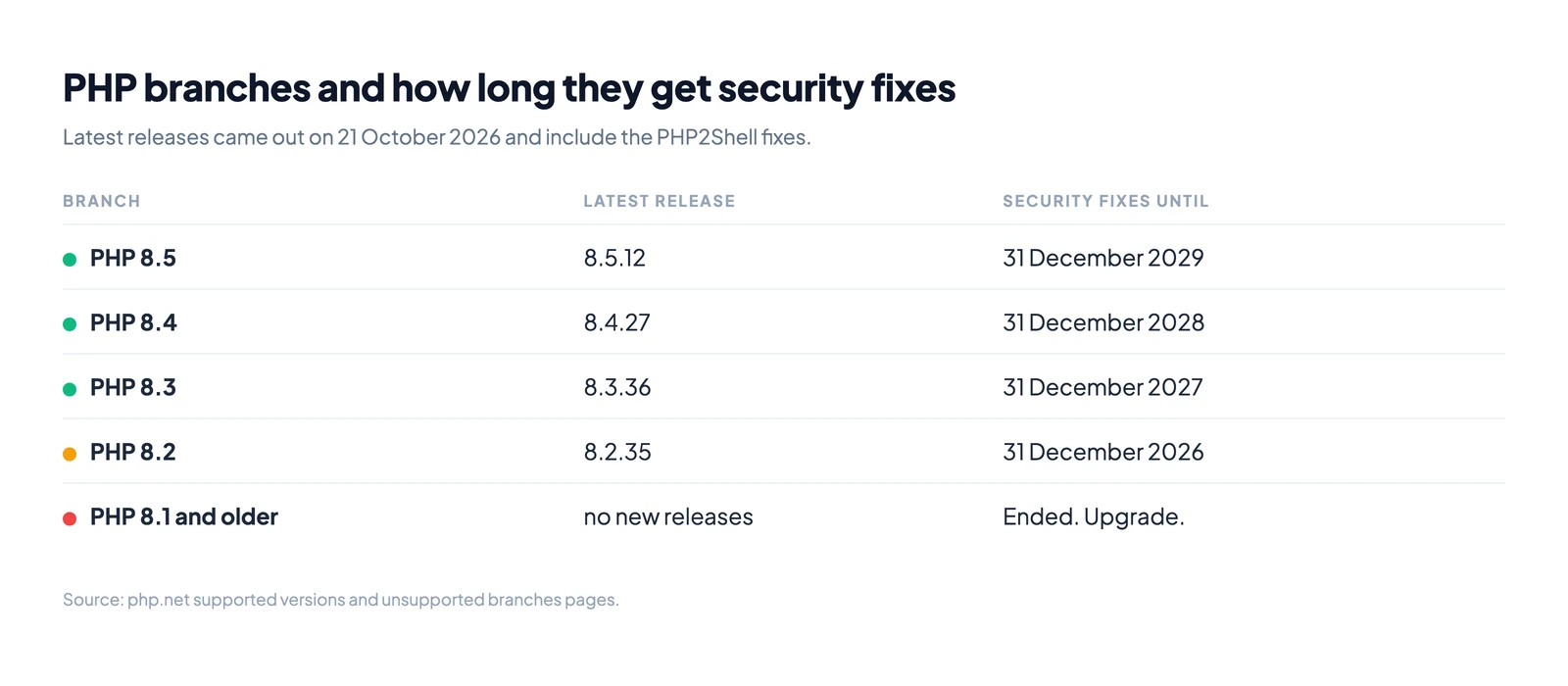
The latest releases above all came out on 21 October 2026. They contain the fixes for PHP2Shell. If your version is lower than the latest release for your branch, update it. Our PHP2Shell guide explains why this release matters.
A note on Linux packages. Debian, Ubuntu and Red Hat often add security fixes to an older release number. So php -v can show an older number on a server that is patched. On these systems, the vendor's security notice is the real check.
How to update PHP
First decide which update you need.
- Same branch, new release. You are on 8.3 and want the latest 8.3. This is a normal system update.
- New branch. You are on 8.1 or 8.2 and want 8.4 or 8.5. This needs a new package source and testing.
Shared hosting
Your host installs PHP releases for you. To move to a new branch, pick it in your panel. In cPanel, this is MultiPHP Manager. Test your site after you switch. If something breaks, you can switch back on the same screen.
Ubuntu and Debian: same branch
sudo apt update
sudo apt upgrade
sudo systemctl restart php8.3-fpm   # use your branch number
sudo systemctl restart apache2      # only if you use Apache
A new package does nothing until PHP restarts. Always restart PHP-FPM or Apache after the update.
Ubuntu and Debian: new branch
Each release ships one PHP branch by default.
| System | Default PHP branch |
|---|---|
| Ubuntu 22.04 LTS | 8.1 |
| Ubuntu 24.04 LTS | 8.3 |
| Ubuntu 26.04 LTS | 8.5 |
| Debian 12 (bookworm) | 8.2 |
| Debian 13 (trixie) | 8.4 |
Ubuntu and Debian keep patching their own PHP packages, so the default branch stays safe on a supported system. If you need a newer branch, most people use Ondřej Surý's packages. His PPA serves Ubuntu 22.04 and 24.04. For newer systems he points to packages.sury.org. These packages are a third party source, not part of Ubuntu.
On Ubuntu 24.04, moving the website to PHP 8.4 looks like this:
sudo add-apt-repository ppa:ondrej/php
sudo apt update
sudo apt install php8.4 php8.4-fpm php8.4-mysql php8.4-xml php8.4-mbstring php8.4-curl
Install the same extensions you had on the old branch. Then point the web server to the new PHP:
# Apache with PHP-FPM
sudo a2disconf php8.3-fpm
sudo a2enconf php8.4-fpm
sudo systemctl restart apache2

# Command line PHP
sudo update-alternatives --set php /usr/bin/php8.4
With Nginx, change the fastcgi_pass line to the new socket, such as /run/php/php8.4-fpm.sock. Then reload Nginx.
Red Hat, AlmaLinux and Rocky Linux
For a new release in the same branch:
sudo dnf upgrade 'php*'
sudo systemctl restart php-fpm
sudo systemctl restart httpd        # only if you use Apache
On RHEL 8 and 9, newer PHP branches come as module streams. To see them and switch:
sudo dnf module list php
sudo dnf module reset php
sudo dnf module enable php:8.3
sudo dnf distro-sync
sudo systemctl restart php-fpm
Docker
Change the image tag in your Dockerfile, for example from php:8.3-fpm to php:8.4-fpm. Rebuild the image and redeploy every container. A running container keeps its old PHP until you replace it.
Windows and macOS
On Windows, download the new build from windows.php.net and replace the old folder. On macOS with Homebrew, run brew upgrade php. Then run php -v to confirm.
Before you move to a new branch
A branch upgrade can break old code. Functions get removed and rules get stricter. Do these checks first.
- Make a backup of the site files and the database.
- Read the migration guide on php.net for each step, such as 8.2 to 8.3.
- Check your plugins, themes and libraries. Update them first. Old versions often fail on new PHP.
- Test on a copy of the site if your host offers staging.
- Watch the error log for a day after the switch.
After the update
Check the version again with the same method you used before. Confirm the website shows the new number, not only the command line.
Keep updating after this. PHP ships new releases for each supported branch through the year, and any of them can carry security fixes.
An unpatched PHP server is a common way in for attackers. A hacked server often sends spam from your domain, and then your real emails start to bounce. If that has happened, see how to check if your email domain is blacklisted.
Watch: update PHP in cPanel
Quick answers
| Question | Answer |
|---|---|
| How do I check my PHP version? | Run php -v, or open Site Health in WordPress, or MultiPHP Manager in cPanel. |
Why do php -v and my website show different versions? | The command line and the web server can use different PHP installs. Check the one the website uses. |
| What PHP version should I use? | A supported branch: 8.2 to 8.5. Pick 8.4 or 8.5 for the longest support. |
| Is PHP 8.1 still safe? | PHP stopped fixing 8.1 on 31 December 2025. Only a Linux vendor that still patches it keeps it safe. |
| Do I need to restart after updating? | Yes. Restart PHP-FPM, Apache or your containers. |
| Will updating PHP break my site? | A new release in the same branch rarely does. A new branch can. Test first. |