
Hard Bounce vs Soft Bounce: What Each One Means and What to Do
A hard bounce is a permanent failure. The email address does not exist, the domain does not exist, or the receiving server has blocked you. If you send again, it will bounce again.
A soft bounce is a temporary failure. The address is real, but something stopped delivery for now. The inbox is full, the server is busy, or the server wants you to try again later. If you send again, it will often go through.
Those are the definitions. There are three more things you need to know, and they matter more than the definitions:
- Different sending tools use different rules. The same bounce can count as hard in one tool and soft in another.
- A correct, working address can still hard bounce. This happens when your email setup is wrong, not the address.
- The bounce rate that gets your account suspended is not always the one you see on your campaign report.
This guide covers all three.
Hard bounce vs soft bounce: the difference
| Hard bounce | Soft bounce | |
|---|---|---|
| What it means | Permanent. The email will not be delivered | Temporary. It may be delivered on a later try |
| Code in the bounce message | Starts with 5 (550, 5.1.1, 5.7.1) | Starts with 4 (421, 450, 4.2.2) |
| Common causes | Address does not exist, domain does not exist, sender blocked | Inbox full, server busy, too many emails at once |
| What your sending tool does | Stops sending to that address, usually right away | Tries again for a while, often up to 72 hours |
| What you should do | Remove the address. Do not send again | Wait. Remove it only if it keeps bouncing |
| Damage to your reputation | High. Many hard bounces tell providers your list is bad | Low for one bounce. Adds up if the same addresses keep bouncing |
What is a hard bounce?
A hard bounce means the receiving server refused your email for good. Trying again will not help.
The email standard, RFC 5321, calls this a permanent failure. Its exact words are that the sender "should not retry" the same request.
There are two kinds of hard bounce. They look the same in your report, but they need different fixes.
Kind one: the address is bad. The mailbox does not exist. Or the domain does not exist. Or the address is spelled wrong. A verified list should never produce these bounces. Here is what they look like:
- Gmail says:
550 5.1.1 The email account that you tried to reach does not exist - Microsoft says:
5.1.1 Bad destination mailbox address - Microsoft also says:
5.4.1 Recipient address rejected: Access denied. Microsoft's own documentation explains this one as "the recipient's address doesn't exist".
An address that was closed when someone left their job also falls into this group.
Kind two: you are blocked. The address is real. But the receiving server will not accept mail from you. These bounces have codes that start with 5.7:
550 5.7.1means a policy block.550 5.7.26means Gmail rejected your email because your domain is not authenticated.550 5.7.30means your email failed a DKIM check.
Your sending tool counts these as hard bounces, because the code starts with 5. But the address is fine. The problem is on your side. We explain this more below, because since 2025 it is the fastest growing cause of hard bounces on clean lists.
What is a soft bounce?
A soft bounce means the receiving server said "not right now". RFC 5321 calls this a temporary failure. Its words are: "the error condition is temporary and the action may be requested again". Your sending tool reads that and tries again later.
Here are the common causes, with the codes you will see:
- Inbox is full. Gmail says
452 4.2.2 The recipient's inbox is out of storage space. The person can delete some emails and make room. - Too many emails too fast. Gmail says
450 4.2.1 The user you are trying to contact is receiving email too quickly. Or421 4.7.28when it sees too much mail from your IP address. Microsoft says4.7.500to4.7.699 Access denied, please try again laterwhile it checks your activity. - Greylisting. Some servers, and many secure email gateways, reject the first email from a sender they do not know. Then they accept it on the second try. The wait is usually about 15 minutes.
- Server is down. A
421code means the server is not available. A4.4.1or4.4.2means the connection failed or timed out. - Email expired. A
4.4.7code means your server kept trying, then gave up. RFC 5321 says servers should keep trying for about four to five days.
One soft bounce is normal. A soft bounce that repeats is a problem. If an inbox is "full" on every send for six weeks, that inbox is not full. It is abandoned. Every sending tool will eventually treat it that way.
How to read the code in a bounce message
Every bounce message has a code. Once you can read it, you do not need anyone's label. You can see for yourself what happened.
There are two codes in each message.
The first code has three digits, like 550 or 421. Only the first digit matters here. A 4 means temporary. A 5 means permanent.
The second code has three numbers with dots, like 5.1.1. The first number repeats the same rule: 4 is temporary, 5 is permanent. The second and third numbers tell you the reason:
.1.1means the mailbox does not exist (the part before the @ sign is wrong)..1.2means the domain does not exist (the part after the @ sign is wrong)..2.2means the inbox is full..7.1means the server refused you because of a policy.
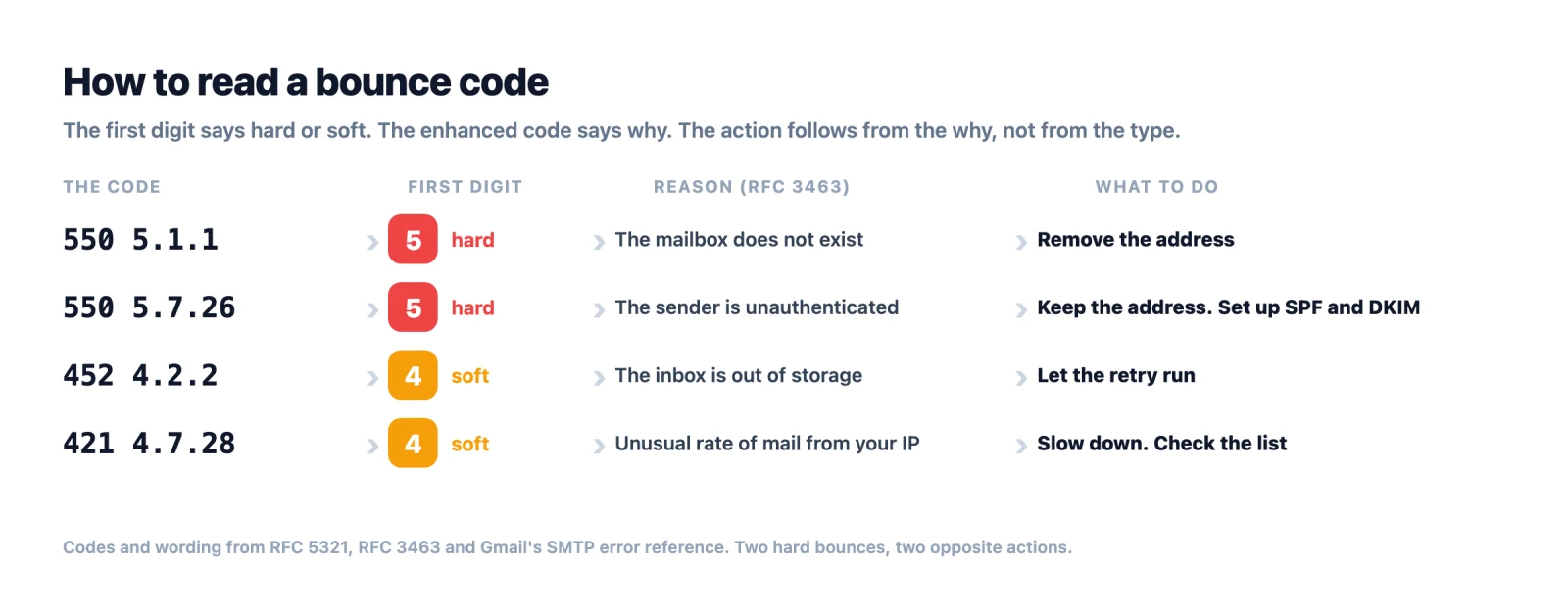
The table below lists the codes you will actually see. The message text is copied from Gmail's and Microsoft's own documentation.
| Code | Where you see it | What it means | Type | What to do |
|---|---|---|---|---|
| 550 5.1.1 | Gmail, Microsoft, most servers | The mailbox does not exist | Hard | Remove the address |
| 5.1.2 | Any server | The domain does not exist | Hard | Remove the address |
| 5.4.1 Recipient address rejected: Access denied | Microsoft | The address does not exist | Hard | Remove the address |
| 550 5.2.1 | Gmail | The account is inactive | Hard | Remove the address |
| 552 5.2.2 | Gmail | Inbox is full and the account is inactive | Hard | Remove the address |
| 452 4.2.2 | Gmail | Inbox is full | Soft | Wait. Remove it if it keeps happening |
| 450 4.2.1 | Gmail | The person is getting too many emails | Soft | Wait |
| 421 4.7.28 | Gmail | Too much mail coming from your IP | Soft | Send slower. Check your list |
| 550 5.7.28 | Gmail | Too much unwanted mail from your IP | Hard | Stop sending. Fix your list and your volume |
| 550 5.7.1 | Gmail, Microsoft | Blocked by a policy | Hard, but the address is fine | Check your authentication and reputation |
| 550 5.7.26 | Gmail | Your domain is not authenticated | Hard, but the address is fine | Set up SPF and DKIM |
| 550 5.7.30 | Gmail | Your email failed DKIM | Hard, but the address is fine | Fix your DKIM setup |
| 5.7.23 | Microsoft | Your email failed SPF | Hard, but the address is fine | Fix your SPF record |
| 5.7.606 to 5.7.649 | Microsoft | Your sending IP is banned | Hard, but the address is fine | Ask Microsoft to remove the ban, then fix the cause |
| 4.7.500 to 4.7.699 | Microsoft | Suspicious activity, blocked for now | Soft | Wait. It clears on its own if you are legitimate |
| 4.4.7 | Any server | The email expired after days of trying | Soft, but it gave up | Remove the address if this repeats |
Look at the last column. Two codes can both be hard bounces and need opposite actions. A 5.1.1 means delete the address. A 5.7.26 means keep the address and fix your DNS.
Why the same bounce is hard in one tool and soft in another
People compare bounce rates between tools and get confused. Here is why.
The receiving server sends a code. That is all it does. Your sending tool then decides what to do with that code. Every tool has its own rule, and the rules are different. Twilio's own guide says: "not all ISPs adhere to that code consistently".
Here are four popular tools and their rules:
| Tool | What it does with a soft bounce | When a soft bounce turns into a hard bounce |
|---|---|---|
| Mailchimp | Tries again and keeps the contact | After 7 soft bounces if the contact never opened anything. After 15 if they have opened before |
| HubSpot | Calls it "pending" and tries for up to 72 hours. Then records a soft bounce | Not automatically. But HubSpot puts "mailbox full" in the hard bounce group, not soft |
| SendGrid | Tries again for up to 72 hours | After 72 hours it stops trying. Hard bounces go on a block list |
| Amazon SES | Tries again for a while, then tells you it stopped | Never automatically. Only hard bounces count toward your bounce rate. Auto-replies do not count at all |
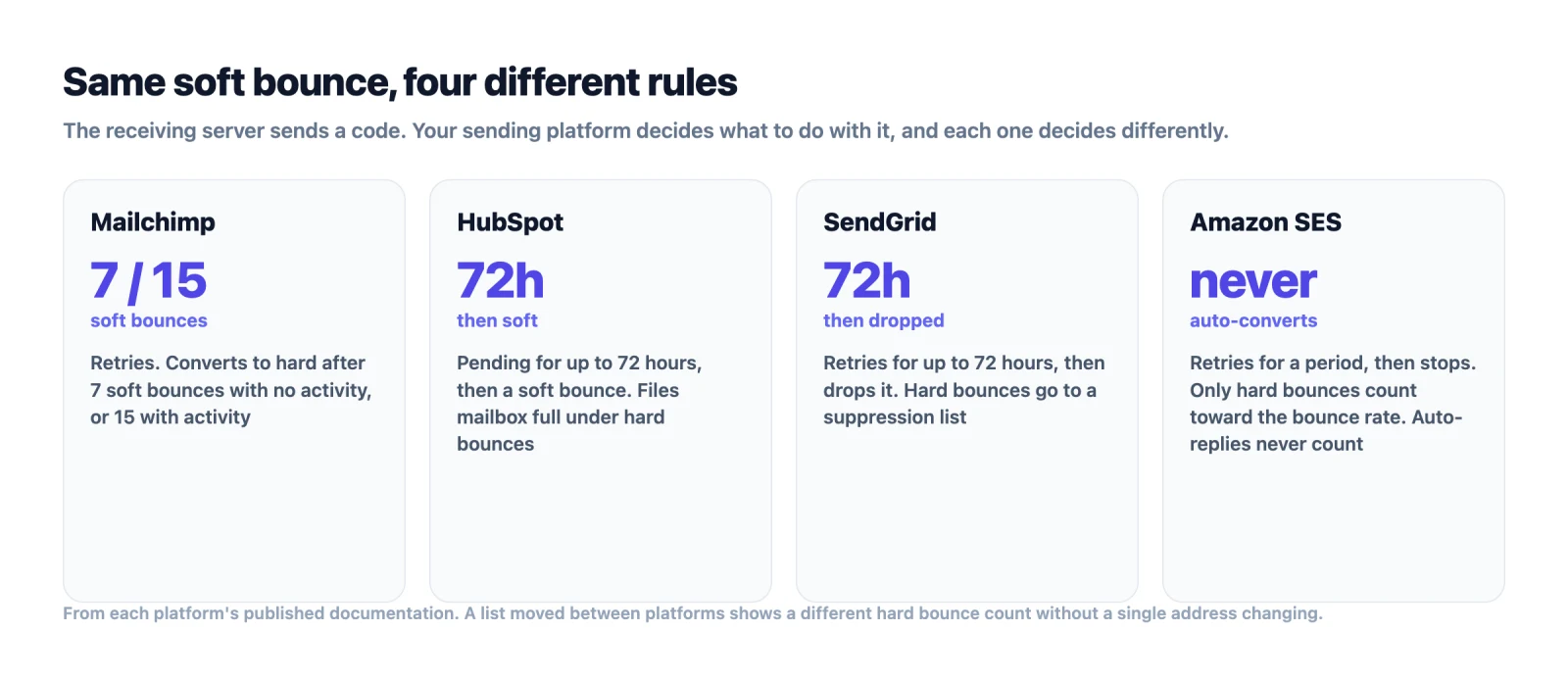
So a full inbox is a soft bounce at Gmail. It is a hard bounce at HubSpot. And at Amazon SES it is a soft bounce that never becomes hard. If your bounce rate changes after you switch tools, check the rules before you blame the list.
The simple fix is to stop trusting the label and read the code. Every tool lets you export the bounce message. The code inside it is the same no matter which tool collected it.
What is an acceptable hard bounce rate?
The limit is set by the company that sends your mail. Most of them do not publish it. Amazon SES does, and its numbers are a good guide to how providers think.
| Hard bounce rate | What Amazon SES does |
|---|---|
| Under 2% | The level SES tells you to stay under "for best results" |
| 5% or more | Your account is put under review |
| 10% or more | Your sending may be paused until you fix it |
Two details matter here. SES counts only hard bounces. Soft bounces and blocked-IP bounces do not count against you. And SES does not use a fixed time window. It looks at a typical amount of your sending, so a small sender is judged the same way as a large one.
Spam complaints travel with bounces. Google's sender guidelines say to keep your complaint rate below 0.10 percent and never let it reach 0.30 percent. Amazon SES reviews accounts at 0.1 percent and may pause them at 0.5 percent. A list that hard bounces above 2 percent usually gets complaints too. Both come from the same cause: people who did not ask for your mail, and addresses nobody checked.
The email bounce rate benchmarks post breaks the safe limits down by type of email and by where the list came from.
Should you remove hard bounces from your list?
Yes. Right away.
Amazon's exact words are: "you should immediately remove the recipient's email address from your mailing list". The same page warns that if you keep sending to hard-bounced addresses, your sending can be paused. Mailchimp does not even give you a choice. Hard-bounced addresses are "cleaned from your audience automatically and immediately" and never sent to again.
Do not retry them. Do not keep them for the next campaign in case the mailbox comes back. A 5.1.1 address that bounced last month will bounce next month. Every extra try tells the mailbox provider that you send to addresses you do not know.
There is one exception. If the code is 5.7.26, 5.7.30, 5.7.23, or a banned IP code like 5.7.6xx, the address is not the problem. Deleting it fixes nothing. Fix your authentication or your reputation. Then send to the same address again.
Soft bounces are the opposite. Leave them alone. Your sending tool will retry on its own. If your tool has no rule for repeat bounces, make one. An address that soft bounces on three sends in a row over a month is not coming back. Mailchimp's rule of seven is a safe limit for anyone.
Why does a correct address hard bounce?
Because a hard bounce measures whether the email was accepted. It does not measure whether the address exists. Four things cause a 5xx bounce on a real, working mailbox.
Your email is not authenticated. On 5 May 2025, Microsoft started enforcing SPF, DKIM and DMARC for any domain sending more than 5,000 emails a day to Outlook.com, Hotmail and Live addresses. First it moved failing mail to junk. Then it started rejecting it with 550 5.7.15 Access denied, sending domain does not meet the required authentication level. Google requires the same three records from bulk senders. Gmail's 550 5.7.26 and 550 5.7.30 codes are what a missing record looks like from your side. All of these codes start with 5. So they land in your hard bounce column, even though the addresses would have accepted the email.
The company blocks unknown addresses at the door. Microsoft Exchange can be set to reject any address that is not in the company directory. It does this with 5.4.1 Recipient address rejected: Access denied. Most of the time that is a true hard bounce. Sometimes it is a new employee whose mailbox has not been added yet. This is why a verifier that checks the mailbox itself gives you a better answer than the bounce did.
A secure email gateway sits in front of the mailbox. Many companies route all incoming mail through a secure email gateway like Proofpoint, Mimecast or Barracuda. The gateway answers for the whole domain. It scans every email and rejects anything that breaks one of its rules, usually with a 5.7.1 policy code. That is a hard bounce against a mailbox that exists. Gateways also cause late bounces. The gateway accepts the email at the door without checking if the mailbox exists. The bounce comes minutes or hours later, after the mail server behind the gateway finds no such mailbox. Your report shows a hard bounce, but it arrived after the send, not during it.
The domain is catch-all. This is the reverse problem. A catch-all domain accepts mail for every address, real or not. So it never says 5.1.1 at the door. The email is accepted, then bounced later, or dropped without a word. About 30 percent of a B2B list sits on these domains. They are where the surprise hard bounces come from.
If you want to know why emails bounce in cold outreach specifically, the causes stack up differently. List age does most of the damage there.
How to stop hard bounces before you send
Almost every 5.1.1 on a campaign report could have been avoided. The mailbox was already gone before you pressed send. Verification asks the receiving server the same question the bounce would have asked, but before the campaign instead of after it.
An email address checker runs three checks in order:
- Syntax. Catches things like
name@gmail..combefore they cost you a send. - Domain. Catches typos like
gmial.comand domains that have expired. - Mailbox. Opens a connection to the receiving server and asks if it will accept mail for that exact address. If the answer is
5.1.1, that is the same bounce you would have got from the campaign. But it costs you no reputation, because no email was sent.
Standard verification stops working in one place. On a catch-all domain, the server says yes to every address. So the check comes back as "unknown" or "risky", and you have to guess. Giggal.ai was built to turn that part of the list into a real valid or invalid answer. The catch-all verification page explains how.
Gateways cause the same problem. A gateway accepts the verifier's question for every address, so a standard check comes back "unknown" there too. Giggal.ai checks these addresses a different way. The post on verifying emails behind secure email gateways explains what the gateway does and how the check gets past it.
For signup forms, add a real-time verification call when the form is submitted. A mistyped address gets caught while the person is still on the page. This is the only step that reduces bounces on lists you have not built yet.
Then deal with two kinds of address that pass verification but still hurt you. Role addresses like info@ and support@ exist, so they pass. But nobody owns them personally, and they get more complaints. Disposable addresses pass while they exist and disappear later. Any good verifier flags both. A cold email list in particular should drop them before the first send.
Frequently asked questions
What is the difference between a hard bounce rate and a soft bounce rate? Each one is that type of bounce divided by the emails you sent. The hard bounce rate is the one that gets you in trouble, because it shows the quality of your list. Amazon SES, for example, only counts hard bounces when it decides to review or pause an account. The soft bounce rate says more about your sending speed, your volume and your reputation. Read it separately.
Should I delete bounced emails? Delete hard bounces with address codes right away: 5.1.1, 5.1.2, 5.2.1 and similar. Keep hard bounces with authentication codes, 5.7.26, 5.7.30 and 5.7.23, and fix your authentication instead. Keep soft bounces and let the retry run. Remove any address that soft bounces several times in a row.
Can a soft bounce become a hard bounce? Yes, in two ways. The receiving server can change its answer. Gmail reports a full inbox as 452 4.2.2 while the account is active, and as 552 5.2.2 once the account goes inactive. Or your sending tool can change the label. Mailchimp turns an address into a hard bounce after 7 soft bounces with no activity, or 15 with activity.
Do soft bounces hurt sender reputation? One does not. A steady stream of them does. Mailbox providers see you sending again and again to inboxes that cannot receive. And a high soft bounce rate is often a warning in itself. A code like 421 4.7.28 is the provider telling you directly to slow down.
Why did my email hard bounce when the address is correct? Almost always because of authentication. Gmail and Outlook.com now reject bulk mail that does not have SPF, DKIM and DMARC. That rejection is a 5xx code, so your tool files it as a hard bounce. Check the code. If it starts with 5.7, the address is not the problem.
A bounce report is only useful if you can read it. Read the first digit. Then read the reason. Then act on the reason. The addresses that would have bounced with 5.1.1 are the easy part, because you can find them before you send. Run the list through Giggal.ai first. The hard bounce column on your next report will mostly be things you could not have known.